Showing posts with label Concurrent Queue. Show all posts

Wednesday, December 26, 2018

QuantLib-Python: Multiprocessing Method Wrapper

In this post, I published a program for simulating term structure up to 30 years with daily time step, using Hull-White one-factor model. The resulting curve was able to replicate the given initial yield curve without any notable differences. The only serious issue here was the cost of running the program in time units.

In order to improve this specific issue, I got familiar with some multi-threading possibilities in Python. Now, there are some deep issues related to the way Python threads are actually implemented and especially the issues with thread locking known as GIL. Related stuff has been completely chewed in here. In order to avoid facing GIL-related issues, another way is to use Python multiprocessing, which allows the programmer to fully leverage multiple processors on a given machine. Moreover, separate processes are completely separate and one process cannot affect another's variables.

Comparison statistics


Again, I simulated term structure up to 30 years with daily time step, using 10000 paths. I did some quick profiling, in order to find the bottlenecks in the original program (sequential). By looking the column task share, we can see, that there are two tasks, which are consuming the most part of the complete running time: path generations (~54%) and path integrations (~46%). After this, I isolated these two parts and processed these by using multiprocessing scheme.


By using multiprocessing (two configured processes), I managed to decrease the complete running time from 163 seconds to 107 seconds. In general, for all those parts which were enjoying the benefits of multiprocessing, improvement ratio (multiprocessing per sequential) is around 0.65.

CPU puzzle


In order to understand the reason for this improvement, let us take a look at processor architecture in my laptop. First, let us check the "Grand Promise" made by System Monitor.


Based on this view, I actually expected to have four CPU for processing. I was then really surprised, that adding third and fourth process was not decreasing running time any further, than having just two processes. After some usual Stackoverflow gymnastics, I finally got the definition to calculate the real number of CPU available in my laptop.


CPU available is "Core(s) per socket * Socket(s)", which is 2 * 1 in my laptop. So, all in all I have only two CPU available for processing, not four as was shown in that System Monitor. This means, that having more than two CPU available in a laptop, one should expect even better improvement ratio than reported in my statistics here.

Wrapper method


In order to avoid code duplication and to come up with something a bit more generic, I started to dream about the possibility to create a mechanism for applying multiprocessing for any given method, if so desired. Such solution is possible by using Python lambda methods.

# method for executing given lambdas in parallel
def MultiprocessingWrapper(targetFunctionList):
    processList = []
    aggregatedResults = []
    queue = mp.Manager().Queue()

    # execute lambda from a given list based on a given index
    # storing results into queue
    def Worker(index):
        result = targetFunctionList[index]()
        queue.put(result)
    
    # start processes, call worker method with index number
    for i in range(len(targetFunctionList)):
        process = mp.Process(target = Worker, args = (i,))
        processList.append(process)
        process.start()
    
    # join processes, extract queue into results list
    for process in processList:
        process.join()
        aggregatedResults.append(queue.get())
        
    # return list of results for a client
    return aggregatedResults

Previous method is receiving a list of lambda methods as its argument. The idea is, that there would be always one lambda method for each process to be started. Why? We might face a situation, in which different set of parameters would be required for each lambda (say, all lambdas would be using the same uniform random generator, but with a different values for seeding the generator). In wrapper method, process is then created to start each configured lambda method. Results calculated by given lambda will be stored into queue. Finally, all results will be imported from queue into result list and returned for a client.

As concrete example, the following program segment is first creating two lambda methods for starting GeneratePaths method, but with different seed value for both processes. After this, wrapper method is then fed with the list of lambdas and processed paths will be received into list of results.

    # task of generating paths is highly time critical
    # use multiprocessing for path generation
    # create lambdas for multiprocessing wrapper
    # target signature: def GeneratePaths(seed, process, timeGrid, n)
    nPaths = 10000
    nProcesses = 2
    seeds = [1834, 66023]
    nPathsPerProcess = int(nPaths / nProcesses)
    target_1 = lambda:GeneratePaths(seeds[0], HW1F, grid.GetTimeGrid(), nPathsPerProcess)
    target_2 = lambda:GeneratePaths(seeds[1], HW1F, grid.GetTimeGrid(), nPathsPerProcess)
    targetFunctionList = [target_1, target_2]
    results = MultiprocessingWrapper(targetFunctionList)

The complete program can be found in my GitHub repository. Finally, a couple of discussion threads, which may be useful in order to understand some QuantLib-related issues, are given in here and here. Thanks for reading my blog and again, Merry Christmas for everyone.
-Mike
  

Tuesday, February 6, 2018

Excel : implementing multithreading using C# and Excel-DNA

Multithreading possibilities for VBA has been chewed in this post. My conclusion back then was, that there is no multi-threading possibilities for VBA. One reader has then been commenting this as follows :

"Correct to say there is no multithreading in VBA however, you can very easily create your multithreading functionality in a c# dll and expose the interface via Interops for VBA to consume. Then all you need to do is to pass in the data into the function and walla, you have multithreading. Interops is a very powerful feature and VBA fully supports it."

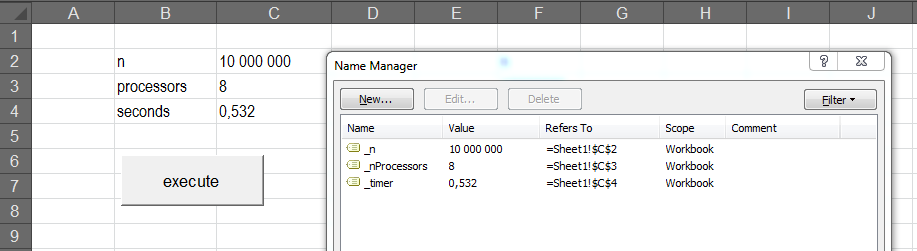
For the sake of completeness, I will present one possible program to implement such multithreading scheme for Excel, by using Parallel class for the actual multi-threading part and Excel-DNA for interfacing the program back to Excel (using Excel only as Input-Output platform). Excel interfacing part used in this post, has already been completely chewed within this post. Note, that by using instructions given in here or here, one can relatively easy interface this multithreading program back to VBA, instead of Excel.

The program


This unsurprising program is simply processing a task (simulate N amount of normally distributed random numbers) shared for M processors. Amount of simulated numbers and number of processors used is decided by the client (Excel). Finally, the program will print the aggregated time consumed for this task back to Excel. Needless to say, the effect of multithreading can be demonstrated by changing the number of processors in Excel worksheet.


Copy-Paste the following program presented below into a new C# project. Also, follow carefully all instructions given in this post.

Thanks for reading this blog.
-Mike

// ExcelInterface.cs
using System;
using System.Collections.Generic;
using System.Diagnostics;
using System.Threading.Tasks;
using System.Windows.Forms;
using ExcelDna.Integration;

namespace ExcelInterface {
    // type definition, delegate for exporting data from processor to queue
    using Processor = Action<int, DataMessenger>;
    public delegate void DataMessenger(List<double> result);

    public static class ExcelInterface {
        // method available in excel
        public static void execute() {
            try {
                // create Excel application object
                dynamic Excel = ExcelDnaUtil.Application;
                //
                // get parameters from worksheet named ranges
                int n = (int)Excel.Range["_n"].Value2;
                int nProcessors = (int)Excel.Range["_nProcessors"].Value2;
                int nPerProcessor = n / nProcessors;
                // create data thread-safe queue and random processors
                RandomQueue messageQueue = new RandomQueue();
                List<Processor> processors = new List<Processor>();
                for (int i = 0; i < nProcessors; ++i) {
                    processors.Add(Factory.CreateProcessor());
                }
                // host timer, execute all processors in parallel
                Stopwatch timer = new Stopwatch();
                timer.Start();
                Parallel.For(0, nProcessors, i => {
                    processors[i].Invoke(nPerProcessor, messageQueue.Enqueue); 
                });
                timer.Stop();
                //
                // print processing time to excel
                double timeElapsed = timer.Elapsed.TotalSeconds;
                Excel.Range["_timer"] = timeElapsed;
            }
            catch (Exception e) {
                MessageBox.Show(e.Message);
            }
        }
    }
}

// RandomQueue.cs
using System;
using System.Collections.Concurrent;
using System.Collections.Generic;

namespace ExcelInterface {
    // wrapper class for ConcurrentQueue data structure
    public class RandomQueue {
        private ConcurrentQueue<List<double>> randomQueue;
        public RandomQueue() {
            randomQueue = new ConcurrentQueue<List<double>>();
        }
        // add
        public void Enqueue(List<double> data) {
            randomQueue.Enqueue(data);
        }
        // remove
        public List<double> Dequeue() {
            List<double> data = null;
            bool hasValue = false;
            while (!hasValue) hasValue = randomQueue.TryDequeue(out data);
            return data;
        }
    }
}
// Factory.cs
using System;
using System.Collections.Generic;

namespace ExcelInterface {
    // type definition
    using Processor = Action<int, DataMessenger>;
    
    public static class Factory {
        // factory method for creating processor for random generator
        public static Processor CreateProcessor() {
            //
            // create standard normal variable generator
            // using action delegate and lambda expression
            Processor process =
            (int n, DataMessenger dataMessenger) => {
                Random generator = new Random(Guid.NewGuid().GetHashCode());
                List<double> normalRandomList = new List<double>();
                // loop through n
                for (int i = 0; i < n; ++i) {
                    double uniformRandomSum = 0.0;
                    // create standard normal random variable using CLT
                    for (int j = 0; j < 12; ++j) {
                        double uniformRandom = 0.0;
                        while (true) {
                            uniformRandom = generator.NextDouble();
                            if (uniformRandom > 0.0) break;
                        }
                        uniformRandomSum += uniformRandom;
                    }
                    normalRandomList.Add(uniformRandomSum - 6.0);
                }
                // send list of normal random variables to queue
                dataMessenger(normalRandomList);
            };
            return process;
        }
    }
}