Wednesday, July 26, 2017

AlgLib : Ho-Lee Calibration Using Levenberg-Marquardt algorithm in VBA

Some time ago, I published one possible C# implementation for Ho-Lee one-factor model calibration scheme using AlgLib numerical libraries. This time I will present an implementation for the same scheme in VBA. General information concerning Levenberg-Marquardt algorithm implementation in AlgLib has been presented in here. Libraries for VBA (collection of BAS module files, which are going to be included into VBA project) can be downloaded from here.

A few words about this implementation. AlgLibLMASolver class uses AlgLib library functions (functions from 21 different modules) for processing (creating optimization model, setting conditions, processing iterations). One data member within this class is having a type of IModel. This data member is actually a reference to an interface, which provides a set of functions for all required calculations (objective function value, values for function terms, partial derivative values for function terms). Since all possible implementations for any interface method must honor signatures exactly, there is a problem with VBA since it does not have a real constructor mechanism. I have chewed this issue in here. It might help to explain the reason, why I have been distributing input parameters for interface implementation by using Dictionary object. Finally, HoLeeZeroCouponCalibration class is implementing IModel interface (a set of functions for all required calculations). In essence, algorithms (AlgLib-related processing) and data (values calculated specifically by using Ho-Lee model) have been completely separated. Needless to say, this type of scheme is flexible for new implementations.

Create a new VBA project and copy-paste the following classes and modules into this project. Also, import all required 21 AlgLib BAS files into this project.

' CLASS : AlgLibLMASolver
Option Explicit
'
' The following 21 AlgLib modules are required for succesfull compilation of this project :
' ablas, ablasf, ap, bdsvd, blas, creflections, densesolver, hblas, linmin, matinv,
' minlbfgs, minlm, ortfac, rcond, reflections, rotations, safesolve, sblas, svd, trfac, xblas
'
Private state As MinLMState
Private report As MinLMReport
Private n As Long
Private m As Long
Private x() As Double
Private model As IModel
Private epsF As Double
Private epsG As Double
Private epsX As Double
Private iterations As Long
'
Public Function initialize( _
    ByVal numberOfVariables As Long, _
    ByVal numberOfEquations As Long, _
    ByRef changingVariables() As Double, _
    ByRef callbackModel As IModel, _
    ByVal epsilonF As Double, _
    ByVal epsilonG As Double, _
    ByVal epsilonX As Double, _
    ByVal maximumIterations As Long)
    '
    n = numberOfVariables
    m = numberOfEquations
    x = changingVariables
    Set model = callbackModel
    epsF = epsilonF
    epsG = epsilonG
    epsX = epsilonX
    iterations = maximumIterations
End Function
'
Public Sub Solve()
    '
    ' create solver scheme using functions and analytical partial derivatives
    Call MinLMCreateFJ(n, m, x, state)
    ' set stopping conditions
    Call MinLMSetCond(state, epsG, epsF, epsX, iterations)
    '
    ' process iterations
    Do While MinLMIteration(state)
        '
        ' calculate value for objective function
        If (state.NeedF) Then
            '
            model.callBackObjectiveFunction state
        End If
        '
        ' calculate values for functions and partial derivatives
        If (state.NeedFiJ) Then
            '
            model.callBackFunction state
            model.callBackJacobian state
        End If
    Loop
    '
    ' process results
    Call MinLMResults(state, x, report)
End Sub
'
' public accessor to (MinLMState) state
Public Property Get GetState() As MinLMState
    GetState = state
End Property
'
' public accessor to (MinLMReport) report
Public Property Get GetReport() As MinLMReport
    GetReport = report
End Property
'
' public accessor to hard-coded report
Public Property Get GetPrettyPrintReport() As String
    '
    Dim message As String
    message = "*** AlgLibLMASolver execution report " + VBA.CStr(VBA.Now) + " ***" + VBA.vbNewLine
    message = message + "TerminationType : " + VBA.CStr(report.TerminationType) + VBA.vbNewLine
    message = message + "Iterations : " + VBA.CStr(report.IterationsCount) + VBA.vbNewLine
    message = message + "Objective function : " + VBA.CStr(state.f) + VBA.vbNewLine
    message = message + VBA.vbNewLine
    '
    Dim i As Integer
    For i = 0 To (state.n - 1)
        message = message + "x(" + VBA.CStr(i) + ") = " + VBA.CStr(state.x(i)) + VBA.vbNewLine
    Next i
    '
    GetPrettyPrintReport = message
End Property
'
'
'
'
'
' CLASS : IModel
Option Explicit
' set of functions for IModel interface
Public Function initialize(ByRef parameters As Scripting.Dictionary)
    ' assign required member data wrapped into dictionary
End Function
'
Public Function callBackObjectiveFunction(ByRef state As MinLMState)
    ' calculate objective function value
End Function
'
Public Function callBackFunction(ByRef state As MinLMState)
    ' calculate values for (non-squared) function terms
End Function
'
Public Function callBackJacobian(ByRef state As MinLMState)
    ' calculate partial derivative values for (non-squared) function terms
End Function
'
'
'
'
'
' CLASS : HoLeeZeroCouponCalibration
Option Explicit
'
Implements IModel
'
Private s As Double
Private r As Double
Private t() As Double
Private z() As Double
'
Private Function IModel_initialize(ByRef parameters As Scripting.IDictionary)
    '
    s = parameters(HOLEE_PARAMETERS.sigma)
    r = parameters(HOLEE_PARAMETERS.shortRate)
    t = parameters(HOLEE_PARAMETERS.maturity)
    z = parameters(HOLEE_PARAMETERS.zeroCouponBond)
End Function
'
Private Function IModel_callBackObjectiveFunction(ByRef state As MinLMState)
    '
    ' calculate value for aggregate objective function
    Dim i As Integer
    Dim hoLeeZero As Double
    Dim f As Double: f = 0
    '
    ' loop through number of equations
    For i = 0 To (state.m - 1)
        '
        hoLeeZero = VBA.Exp(-(1 / 2) * state.x(i) * (t(i) ^ 2) + (1 / 6) * (s ^ 2) * (t(i) ^ 3) - r * t(i))
        f = f + (z(i) - hoLeeZero) ^ 2
    Next i
    state.f = f
End Function
'
Private Function IModel_callBackFunction(ByRef state As MinLMState)
    '
    ' calculate values for (non-squared) function terms
    Dim i As Integer
    Dim hoLeeZero As Double
    '
    ' loop through number of equations
    For i = 0 To (state.m - 1)
        '
        hoLeeZero = VBA.Exp(-(1 / 2) * state.x(i) * (t(i) ^ 2) + (1 / 6) * (s ^ 2) * (t(i) ^ 3) - r * t(i))
        state.FI(i) = (z(i) - hoLeeZero)
    Next i
End Function
'
Private Function IModel_callBackJacobian(ByRef state As MinLMState)
    '
    ' calculate partial derivative values for (non-squared) function terms
    Dim i As Integer, J As Integer
    Dim hoLeeZero As Double
    '
    ' 1. individual (non-squared) function terms
    ' loop through number of equations
    For i = 0 To (state.m - 1)
        '
        hoLeeZero = VBA.Exp(-(1 / 2) * state.x(i) * (t(i) ^ 2) + (1 / 6) * (s ^ 2) * (t(i) ^ 3) - r * t(i))
        state.FI(i) = (z(i) - hoLeeZero)
    Next i
    '
    ' 2. partial derivatives for all (non-squared) function terms
    ' loop through number of equations
    For i = 0 To (state.m - 1)
        '
    ' loop through number of variables
        For J = 0 To (state.n - 1)
            '
            Dim derivative As Double: derivative = 0
            ' partial derivative is non-zero only for diagonal cases
            If (i = J) Then
                derivative = (1 / 2) * VBA.Exp(1) * t(J) ^ 2
                state.J(i, J) = derivative
            End If
        Next J
    Next i
End Function
'
'
'
'
'
' MODULE : DataStructures
Option Explicit
'
Public Enum HOLEE_PARAMETERS
    sigma = 1
    shortRate = 2
    maturity = 3
    zeroCouponBond = 4
End Enum
'
'
'
'
'
' TESTER MODULE
Option Explicit
'
' Ho-Lee model calibration example
Public Sub AlglibTester()
    '
    ' MODEL part
    ' construct all required inputs and model to be calibrated
    Dim sigma As Double: sigma = 0.00039
    Dim shortRate As Double: shortRate = 0.00154
    '
    Dim maturity(0 To 9) As Double
    maturity(0) = 1: maturity(1) = 2: maturity(2) = 3: maturity(3) = 4: maturity(4) = 5:
    maturity(5) = 6: maturity(6) = 7: maturity(7) = 8: maturity(8) = 9: maturity(9) = 10
    '
    Dim zero(0 To 9) As Double
    zero(0) = 0.9964: zero(1) = 0.9838: zero(2) = 0.9611: zero(3) = 0.9344: zero(4) = 0.9059:
    zero(5) = 0.8769: zero(6) = 0.8478: zero(7) = 0.8189: zero(8) = 0.7905: zero(9) = 0.7626
    '
    ' assign parameters into dictionary wrapper
    Dim parameters As New Scripting.Dictionary
    parameters.Add HOLEE_PARAMETERS.sigma, sigma
    parameters.Add HOLEE_PARAMETERS.shortRate, shortRate
    parameters.Add HOLEE_PARAMETERS.maturity, maturity
    parameters.Add HOLEE_PARAMETERS.zeroCouponBond, zero
    '
    ' create and initialize calibration model
    Dim model As IModel: Set model = New HoLeeZeroCouponCalibration
    model.initialize parameters
    '
    ' SOLVER part
    Dim Theta(0 To 9) As Double ' assign initial guesses
    Theta(0) = 0.001: Theta(1) = 0.001: Theta(2) = 0.001: Theta(3) = 0.001: Theta(4) = 0.001:
    Theta(5) = 0.001: Theta(6) = 0.001: Theta(7) = 0.001: Theta(8) = 0.001: Theta(9) = 0.001
    '
    Dim numberOfVariables As Long: numberOfVariables = 10
    Dim numberOfEquations As Long: numberOfEquations = 10
    Dim epsilonF As Double: epsilonF = 0.000000000001
    Dim epsilonG As Double: epsilonG = 0.000000000001
    Dim epsilonX As Double: epsilonX = 0.000000000001
    Dim maximumIterations As Long: maximumIterations = 25000
    '
    ' create and initialize solver model
    Dim solver As New AlgLibLMASolver
    solver.initialize _
        numberOfVariables, _
        numberOfEquations, _
        Theta, _
        model, _
        epsilonF, _
        epsilonG, _
        epsilonX, _
        maximumIterations
    '
    ' solve calibration model
    solver.Solve
    '
    ' print hard-coded report containing values for
    ' objective function, variables and other information
    Debug.Print solver.GetPrettyPrintReport
End Sub
'

The results from this calibration model have been verified against the previous results.


Importing several files into project may involve considerable amount of cruel and unusual repetitive labour. For this specific reason, I have also been woodshedding a separate module (employing VBIDE object), which might give some relief when babysitting those AlgLib modules.

' The following dll libraries need to be referenced :
' Microsoft Visual Basic for Applications Extensibility 5.X, Microsoft Scripting Runtime
Option Explicit
Option Base 0
'
' address to a list, which contains all BAS files which will be included into project
Const listFolderPathName As String = "C:\AlgLib\vba\AlgLibLMAModules.txt"
' address to a folder, which contains all AlgLib BAS files
Const moduleFolderPathName  As String = "C:\AlgLib\vba\alglib-2.6.0.vb6\vb6\src\"
' select TRUE, if Require Variable Declaration in editor is tagged
Const removeOptionExplicitDirective As Boolean = True
'
Public Sub ImportModules()
    '
    ' create a list of modules to be imported into this project
    Dim list() As String: list = createProjectModuleList
    ' import modules into active project
    import list
End Sub
'
Public Sub ExportModules()
    '
    ' create a list of modules to be exported from this project
    Dim list() As String: list = createProjectModuleList
    ' export modules from active project into a defined folder
    export list
End Sub
'
Public Sub RemoveModules()
    '
    ' create a list of modules to be removed from this project
    Dim list() As String: list = createProjectModuleList
    ' delete modules from active project
    remove list
End Sub
'
Private Function import(ByRef list() As String)
    '
    Dim editor As VBIDE.VBProject
    Set editor = ActiveWorkbook.VBProject
    Dim fileSystem As Scripting.FileSystemObject: Set fileSystem = New Scripting.FileSystemObject
    '
    ' loop through all files in a specific source folder for modules
    Dim filesInGivenList As Integer: filesInGivenList = UBound(list) + 1
    If (filesInGivenList = 0) Then Exit Function
    '
    Dim module As VBIDE.VBComponent
    Dim file As Scripting.file
    For Each file In fileSystem.GetFolder(moduleFolderPathName).Files
        '
        ' if there is a given list of specific files to be included
        ' select only the files in that list to be imported into project
        If Not (moduleIsIncluded(file.Name, list)) Then GoTo skipPoint
        '
        Set module = editor.VBComponents.Add(vbext_ct_StdModule)
        If (removeOptionExplicitDirective) Then module.CodeModule.DeleteLines 1
        module.Name = VBA.Split(file.Name, ".")(0)
        module.CodeModule.AddFromFile file.Path
skipPoint:
    Next
End Function
'
Private Function export(ByRef list() As String)
    '
    Dim filesInGivenList As Integer: filesInGivenList = UBound(list) + 1
    If (filesInGivenList = 0) Then Exit Function
    '
    Dim editor As VBIDE.VBProject
    Set editor = ActiveWorkbook.VBProject
    Dim module As VBIDE.VBComponent
    '
    ' loop through all modules
    For Each module In editor.VBComponents
        '
        ' export module only if it is included in the list
        If (moduleIsIncluded(module.Name + ".bas", list)) Then
            module.export moduleFolderPathName + module.Name + ".bas"
        End If
    Next
End Function
'
Private Function remove(ByRef list() As String)
    '
    Dim filesInGivenList As Integer: filesInGivenList = UBound(list) + 1
    If (filesInGivenList = 0) Then Exit Function
    '
    Dim editor As VBIDE.VBProject
    Set editor = ActiveWorkbook.VBProject
    Dim module As VBIDE.VBComponent
    '
    ' loop through all modules
    For Each module In editor.VBComponents
        '
        ' remove module only if it is included in the list
        If (moduleIsIncluded(module.Name + ".bas", list)) Then
            module.Collection.remove module
        End If
    Next
End Function
'
Private Function moduleIsIncluded(ByVal FileName As String, ByRef list() As String) As Boolean
    '
    ' check if a given file name is in the list
    Dim isIncluded As Boolean: isIncluded = False
    Dim i As Integer
    For i = 0 To UBound(list)
        If (FileName = list(i)) Then
            isIncluded = True
            Exit For
        End If
    Next i
    moduleIsIncluded = isIncluded
End Function
'
Private Function createProjectModuleList() As String()
    '
    ' create a list of file names from text file
    Dim fileSystem As Scripting.FileSystemObject: Set fileSystem = New Scripting.FileSystemObject
    Dim fileReader As Scripting.TextStream: Set fileReader = fileSystem.OpenTextFile(listFolderPathName, ForReading)
    Dim fileStreams As String: fileStreams = fileReader.ReadAll
    Dim streams As Variant: streams = VBA.Split(fileStreams, VBA.vbNewLine)
    Dim list() As String: ReDim list(0 To UBound(streams))
    Dim i As Integer
    For i = 0 To UBound(streams)
        list(i) = VBA.Trim(streams(i))
    Next i
    createProjectModuleList = list
End Function
'

Finally, thanks for reading this blog.
-Mike

Sunday, July 23, 2017

Excel/VBA : Publishing HTML Reports from Excel


In my opinion, creating reports directly from Excel workbook is a bit old-fashioned way to handle the case. For any official reporting (meant to be published for a wide audience of stakeholders, needs to have traceable history), my recommendation is pretty much the following : process calculations (say, by using third-party software), process results into SQL server database (to store report history), create views using relevant database tables, finally use SSRS by linking report graphical objects with database views for report publishing.

However, there might still be some cases, in which this kind of processing would definitely be considered as overkill. Say, a batch of processed daily calculation results must be shared within the unit for some internal (informal) checking. For such cases, creating report directly from Excel workbook by using publishObject in VBA is quite handy and inexpensive solution. So, what to do then ? First, create a report page (one centralized worksheet) from which all the reports (there can be more than just one report to be published) will be published. For each report, define a named range which covers the exact area to be published. As an example, the screenshot below shows imaginary Excel report what I have created. Note, that the actual file name for HTML file has been defined as a comment property of Excel.Name object. Note also, that the figures in table below are arbitrary.


Next, I have defined a network folder (hard-coded in the program) into which this report will be published as html page. Finally, I have implemented the program (presented below) in Excel, from which the report (or several reports) will be published. As a user will press command button (create reports), the program will create html file, as shown in the screenshot below.


VBA program for handling command button "click" event is presented below.

Option Explicit
'
Private Const folderPathNameForHTMLFiles As String = "C:\temp\HTMLReporting\"
'
Private Sub btnCreateReports_Click()
    '
    ' deactivate command button pressing
    ActiveSheet.Range("A1").Select
    '
    Dim reportRangeName As Excel.Name
    Dim reportRange As Excel.Range
    Dim report As PublishObject
    Dim reports As PublishObjects: Set reports = ActiveWorkbook.PublishObjects
    '
    ' loop through all names within active workbook
    For Each reportRangeName In ActiveWorkbook.Names
        '
        ' preparation for the case, in which the name is corrupted
        On Error GoTo exitPoint
        ' handle only the names related to ranges in reporting worksheet
        If (reportRangeName.RefersToRange.Worksheet.Name = ActiveSheet.Name) Then
            '
            ' disable screen updating
            Excel.Application.ScreenUpdating = False
            ' create Excel range for report
            Set reportRange = Worksheets(ActiveSheet.Name).Range(reportRangeName.Name)
            reportRange.Select
            '
            ' create path and name for HTML report file
            ' file name (including html extension) is defined as comment within Excel name
            Dim HTMLFilePathName As String
            HTMLFilePathName = folderPathNameForHTMLFiles + reportRangeName.Comment
            '
            ' create and publish report as publishedObject object
            Set report = reports.Add( _
                SourceType:=xlSourceRange, _
                fileName:=HTMLFilePathName, _
                Sheet:=reportRange.Worksheet.Name, _
                Source:=reportRange.Address, _
                HtmlType:=xlHtmlStatic)
            report.Publish True
        End If
        '
exitPoint:
    Next
    '
    ' finally, delete all reports from active workbook
    reports.Delete
    Range("A1").Select
    Excel.Application.ScreenUpdating = True
End Sub
'

Finally, thanks a lot for reading this blog.
-Mike

Wednesday, July 19, 2017

Batch scripting : managing configurational complexity


Processing calculations using third-party analytical software may turn out to be more like a process, requiring several independent tasks to be executed in a certain order, before any actual magic will happen. The one I have been using, was initially delivered with relatively large collection of black box executables. I decided to streamline those executables out from the picture by (first studying and then) using API. However, there were still a lot of tricky housekeeping stuff to be done before and after the actual number crunching (ex. required source data creation, result processing).

For all required housekeeping stuff, I created independent programs (executables), which were wrapped inside batch script files to be called, since a lot of auxiliary information was required as feed for executables (ex. address to configuration file). The process was working like a dream up to the point, in which some minor changes were made into existing network folder structure. I confess the following : almost all path addresses in batch script wrapper files were actually hard-coded. In order to compensate this horrible tragedy, I decided to use relative paths in script files. Solution was again technically working well, but script files were quickly being polluted by lines of incomprehensible streams. Solving possible issues would definitely be excrutiating experience for any non-experienced person. I also realized, that given some specific change to be made in the future, there would still be janitor work to be done with several script files. Bad omen.

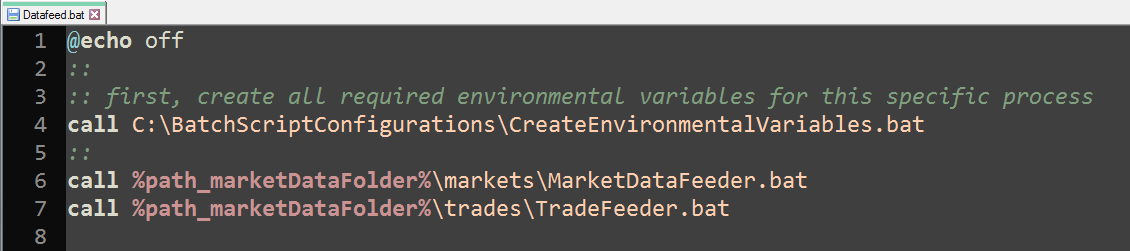
As being non-expert on batch scripting, I finally decided to go to direction which is the most comfortable for me : constructing all required configurations from one centralized place. For this specific process, I created a batch script which is creating all possible configuration strings (mostly addresses to folders containing other configurations or executables). This script would then be called, before any other batch script content would be executed. Since the law of conservation of misery states "total amount of misery in a system is constant", one may well then ask what was the actual gain ? Firstly, lines of commands in wrapper script files were much more comprehensible (think about someone else on your desk when something happens) and secondly, given any future changes in network directory, changes would be made only in one place. At least for me, these issues are more than justifying the proposed scheme.


Batch script implementations


Script for creating "global" configurations


Script for using "global" configurations script


Script (MarketDataFeeder.bat) being called inside previous script


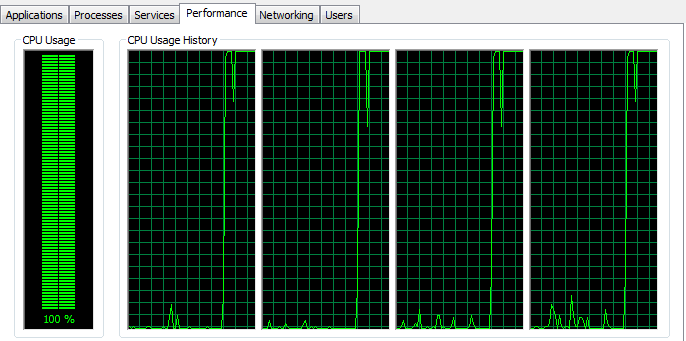
Test run (executing Datafeed.bat)


Finally, thanks for reading this blog.
-Mike

Friday, June 9, 2017

Excel/VBA : Multi-threading example

Let us face the fact : there is no multi-threading possibilities for VBA. However, if you have any VBA program in your Excel workbook, create multiple copies of that workbook and finally start that VBA program within each of the copied workbook, you got multiple Excel workbooks (VBA programs) running simultaneously. By definition, that is multi-threading.

One may ask with very good reason why even bother, since we already have easy-to-use multi-threading libraries available for more sophisticated languages ? Sometimes you may not have any other choice. A few years ago I started to work with one "state-of-the-art" analytics library for processing some extremely time-consuming calculations. By that time, all calculations were supposed to be processed in Excel and we did not have any access to real development API. Very fortunately, I discovered a collection of relevant VBA interface functions available for that library. Despite of this amazing discovery, processing calculations in VBA was still annoyingly slow. Finally I decided to test the scheme described above. I created multiple copies of one master workbook (which was having a relevant program for processing required calculations), opened multiple Excel workbooks and finally started a program within each workbook (almost) simultaneously. This was truly a "poor man's multi-threading", but despite of that it really did the job well. Example program in this post is taking this described scheme a bit further, as it completely removes the burden of administrating required Excel workbooks.

The main idea for this program is to create desired amount of active workbook copies (which has a relevant program for processing required calculations) into a folder. Moreover, for each of the workbook copy, corresponding VB script file will be created for starting required VBA program within Excel workbook copy. VB script is also taking care of all relevant administrative responsibilities (cleaning all Excel workbooks and VB script files from folder after program execution). Calculation results from different Excel threads will be printed into a shared text file. It should be noted, that SomeComplexAlgorithm procedure is an entry point for Excel thread (started by VB script). For brevity reasons, the content of this example program has been left to be trivial (simulate random number between one and ten for delay time execution and finally store that number into a collection).

Insert a new VBA module and copy-paste the following program.

Option Explicit
'
' common text file for results from all Excel threads
Private Const resultsFilePathName As String = "C:\Users\Administrator\Desktop\ExcelThreading\shared.txt"
'
Public Sub CreateExcelThreads()
    '
    ' clean results text file
    Dim fileSystem As New Scripting.FileSystemObject
    fileSystem.CreateTextFile resultsFilePathName, True
    Set fileSystem = Nothing
    '
    ' create (and execute) Excel workbook threads
    Dim ExcelThreadsFolderPathName As String: ExcelThreadsFolderPathName = "C:\Users\Administrator\Desktop\ExcelThreading\"
    Dim numberOfExcelThreads As Integer: numberOfExcelThreads = 4
    Dim ExcelThreadName As String
    Dim i As Integer
    '
    For i = 1 To numberOfExcelThreads
        ExcelThreadName = "ExcelThread_" + VBA.CStr(i)
        ExecuteExcelThread "SomeComplexAlgorithm", ExcelThreadName, ExcelThreadsFolderPathName
    Next i
End Sub
'
Public Function ExecuteExcelThread(ByVal TargetProgram As String, ByVal ExcelThreadName As String, ByVal ExcelThreadsPathName As String)
    '
    ' save a copy of current active workbook
    Dim ExcelThreadFilePathName As String: ExcelThreadFilePathName = ExcelThreadsPathName + ExcelThreadName + ".xlsm"
    TargetProgram = ExcelThreadName + ".xlsm!" + TargetProgram
    Dim VBScriptFilePathName As String: VBScriptFilePathName = ExcelThreadsPathName + ExcelThreadName + ".vbs"
    ActiveWorkbook.SaveCopyAs ExcelThreadFilePathName
    '
    ' create commands for VB script file
    Dim fileSystem As New Scripting.FileSystemObject
    Dim writer As Scripting.TextStream
    Set writer = fileSystem.OpenTextFile(VBScriptFilePathName, ForWriting, True)
    ' re-open previously saved Excel workbook
    writer.WriteLine "Set ExcelApplication = CreateObject(""Excel.Application"")"
    writer.WriteLine "Set ExcelWorkbook = ExcelApplication.Workbooks.Open(""" + ExcelThreadFilePathName + """)"
    writer.WriteLine "ExcelApplication.Visible = False"
    ' run target VBA program and close Excel workbook
    writer.WriteLine "ExcelWorkbook.Application.Run """ + TargetProgram + """"
    writer.WriteLine "ExcelApplication.ActiveWorkbook.Close True"
    writer.WriteLine "ExcelApplication.Application.Quit"
    ' delete copies of Excel workbook and VB script
    writer.WriteLine "Set fileSystem = CreateObject(""Scripting.FileSystemObject"")"
    writer.WriteLine "fileSystem.DeleteFile """ + ExcelThreadFilePathName + """"
    writer.WriteLine "fileSystem.DeleteFile """ + VBScriptFilePathName + """"
    writer.Close
    Set writer = Nothing
    Set fileSystem = Nothing
    '
    ' execute VB script
    Dim scriptingShell As Object: Set scriptingShell = VBA.CreateObject("WScript.Shell")
    scriptingShell.Run VBScriptFilePathName
    Set scriptingShell = Nothing
End Function
'
Public Sub SomeComplexAlgorithm()
    '
    ' this is target program to be executed by Excel thread
    ' program creates N random numbers between 1 and 10, stores these into
    ' collection and finally prints the content into a specific text file
    Dim simulationResult As New Collection
    Dim i As Integer
    For i = 1 To 25
        ' due to brevity reasons, we just simulate some time-consuming algorithm
        Dim delayTime As Long: delayTime = WorksheetFunction.RandBetween(1, 10)
        Sleep delayTime
        ' store one simulated result (random delay time) into collection
        simulationResult.Add delayTime
    Next i
    '
    ' print result collection into a specific text file
    ' we have to be prepared for the case in which multiple users (Excel threads)
    ' are accessing the same specific text file at the same time
recoveryPoint:
    On Error GoTo errorHandler
    Dim fileSystem As New Scripting.FileSystemObject
    Dim writer As Scripting.TextStream
    '
    ' if the file is in use, error will be thrown below here
    Set writer = fileSystem.OpenTextFile(resultsFilePathName, ForAppending, False)
    For i = 1 To simulationResult.Count
        writer.WriteLine ActiveWorkbook.Name + "=" + VBA.CStr(simulationResult(i))
    Next i
    writer.Close
    Set simulationResult = Nothing
    Set writer = Nothing
    Set fileSystem = Nothing
    Exit Sub
    '
errorHandler:
    ' get one second delay and re-access text file
    Sleep 1
    Resume recoveryPoint
End Sub
'
Public Function Sleep(ByVal seconds As Long)
    '
    Dim startTime As Long: startTime = VBA.Timer
    Do
        If (VBA.Timer >= (startTime + seconds)) Then Exit Do
    Loop
End Function
'

Simulating 100 random numbers (setting delay time to 1) using just one Excel thread : processing time 0:01:50.


Simulating 100 random numbers (setting delay time to 1) using four Excel threads (25 numbers for each thread) : processing time 0:00:30, which turns out to be almost quadruple time improvement in comparison with single-threaded processing.


Finally, thanks for reading this blog.
-Mike

Friday, March 24, 2017

C++11 : Wrapper for Bloomberg API Reference Data

Bloomberg is offering an access to its market data API with several different programming languages. Previously, I have presented my wrappers for VBA and C#. This time, I wanted to open up an implementation for C++ wrapper, which covers different types of reference data requests (snapshot, historical, intraday bar, intraday tick). For reference data, API functionality is basically the same for all types of data request types : create inputs (security, field), start session, open service, create request, send request to server, poll for results, unzip messages from server and finally, stop session.

Notes


There were some tough decisions to make. In my C# wrapper, I was sub-classing algorithm for handling messages from server (unzipping message content into data structure). Within this implementation, I made a decision to prefer straightforward simplicity, even it would mean a bit of data duplication. Personally, when using this kind of functionality, I would prefer to have just one single class (one header, one implementation), instead of having several classes.

Another big issue was concerning data output coming from Bloomberg server back to a client : how to pack all requested data into data structure to be easily used by a client ? In C# implementation we had dynamic data type, which enables us to create arrays of dynamic data types. However, in C++ there are no heterogeneous data structures available, besides std::tuple. Initially, I was considering to use tuple as result data structure, but I decided to reject the idea due to material increase in general complexity. I decided to return all possible data types from Bloomberg server as std::string within result data structure. It would be then up to a client to convert these values "back to their origins", by using std::stod or some other conversion method.

For the sake of clarity, I have created type definitions for several nested data structures used in the program : Vector [std::vector<std::string>], Matrix for all types of reference data [std::vector<Vector>] and Cube for historical time-series data [std::vector<Matrix>].

Finally, in order to "make it happen", a set of header files and libraries has to be configured into Visual Studio project. Extremely well-written and complete step-by-step tutorial is available in here.

Header file


#pragma once
//
#include <memory>
#include <string>
#include <vector>
#include <algorithm>
#include <blpapi_session.h>
//
namespace MikeJuniperhillBloombergCPPDesktopAPI
{
 using namespace BloombergLP::blpapi;
 using Vector = std::vector<std::string>; // string vector
 using Matrix = std::vector<Vector>; // string matrix
 using Cube = std::vector<Matrix>; // string cube
 enum ENUM_PRICING_OPTION { PRICING_OPTION_PRICE, PRICING_OPTION_YIELD };
 enum ENUM_PERIODICITY_ADJUSTMENT { ACTUAL, CALENDAR, FISCAL };
 enum ENUM_PERIODICITY_SELECTION { DAILY, WEEKLY, MONTHLY, QUARTERLY, SEMI_ANNUALLY, YEARLY };
 enum ENUM_NON_TRADING_DAY_FILL_OPTION { NON_TRADING_WEEKDAYS, ALL_CALENDAR_DAYS, ACTIVE_DAYS_ONLY };
 enum ENUM_NON_TRADING_DAY_FILL_METHOD { PREVIOUS_VALUE, NIL_VALUE };
 //
 class BBCOMMDataRequest
 {
 public:
  BBCOMMDataRequest(std::string serverHost = "localhost", unsigned short serverPort = 8194);
  void Start();
  void GetReferenceData(Vector& securities, Vector& fields, Matrix& result,
   Vector& overrideFields = Vector(), Vector& overrideValues = Vector());
  void GetHistoricalData(Vector& securities, Vector& fields, Cube& result,
   std::string startDate, std::string endDate,
   ENUM_PRICING_OPTION pricingOption = PRICING_OPTION_PRICE,
   ENUM_PERIODICITY_SELECTION periodicitySelection = DAILY,
   ENUM_PERIODICITY_ADJUSTMENT periodicityAdjustment = ACTUAL,
   ENUM_NON_TRADING_DAY_FILL_OPTION nonTradingDayFillOption = ALL_CALENDAR_DAYS,
   ENUM_NON_TRADING_DAY_FILL_METHOD nonTradingDayFillMethod = PREVIOUS_VALUE,
   std::string overrideCurrency = std::string(),
   Vector& overrideFields = Vector(),
   Vector& overrideValues = Vector());
  void GetIntradayBarData(std::string security, Vector& fields, Matrix& result, 
   std::string eventType, int intervalInMinutes, Datetime start, Datetime end);
  void GetIntradayTickData(std::string security, Vector& fields, Matrix& result, Vector& eventTypes,
   Datetime start, Datetime end, bool includeConditionCodes = false, bool includeExchangeCodes = false);
  void Stop();
 private:
  std::unique_ptr<SessionOptions> sessionOptions;
  std::unique_ptr<Session> session;
  std::unique_ptr<Service> service;
  std::unique_ptr<Request> request;
  std::string serverHost;
  unsigned short serverPort;
 };
}
//


Implementation file


#pragma once
#include "BBCOMMDataRequest.h"
using namespace MikeJuniperhillBloombergCPPDesktopAPI;
//
BBCOMMDataRequest::BBCOMMDataRequest(std::string serverHost, unsigned short serverPort) 
 : serverHost(serverHost), serverPort(serverPort)
{
 // ctor with default parameters for server hosting and port
}
void BBCOMMDataRequest::Start()
{
 // create objects : session options and session
 sessionOptions = std::unique_ptr<SessionOptions>(new SessionOptions);
 sessionOptions->setServerHost(serverHost.c_str());
 sessionOptions->setServerPort(serverPort);
 session = std::unique_ptr<Session>(new Session(*sessionOptions));
 //
 // start session and open service, throw if not succeeded
 if (!session->start()) throw std::exception("session not started");
 if (!session->openService("//blp/refdata")) throw std::exception("service not opened");
}
void BBCOMMDataRequest::GetReferenceData(Vector& securities, Vector& fields, Matrix& result,
 Vector& overrideFields, Vector& overrideValues)
{
 // initialize result data structure with default '#N/A' for all items
 for (unsigned int i = 0; i < securities.size(); ++i)
 {
  Vector innerVector(fields.size(), "#N/A");
  result.push_back(innerVector);
 }
 // create objects : service and request
 service = std::unique_ptr<Service>(new Service(session->getService("//blp/refdata")));
 request = std::unique_ptr<Request>(new Request(service->createRequest("ReferenceDataRequest")));
 //
 // append securities and field requests into request object
 std::for_each(securities.begin(), securities.end(), [this](std::string s) { request->append("securities", s.c_str()); });
 std::for_each(fields.begin(), fields.end(), [this](std::string f) { request->append("fields", f.c_str()); });
 //
 // conditionally, append overrides into request object
 if (overrideFields.size() > 0)
 {
  Element requestOverrides = request->getElement("overrides");
  for (unsigned int i = 0; i < overrideFields.size(); ++i)
  {
   Element requestOverride = requestOverrides.appendElement();
   requestOverride.setElement("fieldId", overrideFields[i].c_str());
   requestOverride.setElement("value", overrideValues[i].c_str());
  }
 }
 // finally send data request to server
 session->sendRequest(*request);
 //
 // start polling server response for data request
 bool isProcessing = true;
 while (isProcessing)
 {
  // catch all 'response-typed' events from server
  Event bEvent = session->nextEvent();
  if ((bEvent.eventType() == Event::PARTIAL_RESPONSE) || (bEvent.eventType() == Event::RESPONSE))
  {
   // create iterator for accessing server message
   MessageIterator bMessageIterator(bEvent);
   while (bMessageIterator.next())
   {
    // get access to message, extract all included securities
    Message bMessage = bMessageIterator.message();
    Element bSecurities = bMessage.getElement("securityData");
    int nSecurities = bSecurities.numValues();
    //
    // loop through all securities in current server response batch
    for (int i = 0; i < nSecurities; ++i)
    {
     // extract one security and all available fields for this security
     Element bSecurity = bSecurities.getValueAsElement(i);
     Element bFields = bSecurity.getElement("fieldData");
     int sequenceNumber = bSecurity.getElementAsInt32("sequenceNumber");
     int nFieldNames = fields.size();
     //
     // loop through all requested fields
     for (int j = 0; j < nFieldNames; ++j)
     {
      // assign string value only if the field is included in delivery
      if (bFields.hasElement(fields[j].c_str()))
      {
       Element bField = bFields.getElement(fields[j].c_str());
       result[sequenceNumber][j] = bField.getValueAsString();
      }
     }
    }
   }
   // when event type is response, there will be no more messages from server
   if (bEvent.eventType() == Event::RESPONSE) isProcessing = false;
  }
 }
}
void BBCOMMDataRequest::GetHistoricalData(Vector& securities, Vector& fields, Cube& result,
 std::string startDate, std::string endDate,
 ENUM_PRICING_OPTION pricingOption,
 ENUM_PERIODICITY_SELECTION periodicitySelection,
 ENUM_PERIODICITY_ADJUSTMENT periodicityAdjustment,
 ENUM_NON_TRADING_DAY_FILL_OPTION nonTradingDayFillOption,
 ENUM_NON_TRADING_DAY_FILL_METHOD nonTradingDayFillMethod,
 std::string overrideCurrency,
 Vector& overrideFields,
 Vector& overrideValues)
{
 bool resultHasDimension = false;
 // create objects : service and request
 service = std::unique_ptr<Service>(new Service(session->getService("//blp/refdata")));
 request = std::unique_ptr<Request>(new Request(service->createRequest("HistoricalDataRequest")));
 //
 // append securities and field requests into request object
 std::for_each(securities.begin(), securities.end(), [this](std::string s) { request->append("securities", s.c_str()); });
 std::for_each(fields.begin(), fields.end(), [this](std::string f) { request->append("fields", f.c_str()); });
 //
 // conditionally, append overrides into request object
 if (overrideFields.size() > 0)
 {
  Element requestOverrides = request->getElement("overrides");
  for (unsigned int i = 0; i < overrideFields.size(); ++i)
  {
   Element requestOverride = requestOverrides.appendElement();
   requestOverride.setElement("fieldId", overrideFields[i].c_str());
   requestOverride.setElement("value", overrideValues[i].c_str());
  }
 }
 //
 // set optional parameters for historical data request
 request->set("startDate", startDate.c_str());
 request->set("endDate", endDate.c_str());
 request->set("pricingOption", pricingOption);
 request->set("periodicityAdjustment", periodicityAdjustment);
 request->set("periodicitySelection", periodicitySelection);
 request->set("nonTradingDayFillOption", nonTradingDayFillOption);
 request->set("nonTradingDayFillMethod", nonTradingDayFillMethod);
 if (!overrideCurrency.empty()) request->set("currency", overrideCurrency.c_str());
 //
 // finally send data request to server
 session->sendRequest(*request);
 //
 // start polling server response for data request
 bool isProcessing = true;
 while (isProcessing)
 {
  // catch all 'response-typed' events from server
  Event bEvent = session->nextEvent();
  //
  if ((bEvent.eventType() == Event::PARTIAL_RESPONSE) || (bEvent.eventType() == Event::RESPONSE))
  {
   // create iterator for accessing server message
   MessageIterator bMessageIterator(bEvent);
   // unzip and pack messages received from BBCOMM server
   while (bMessageIterator.next())
   {
    // receive one security per message and multiple messages per event
    Message bMessage = bMessageIterator.message();
    Element bSecurity = bMessage.getElement("securityData");
    Element bFields = bSecurity.getElement("fieldData");
    int sequenceNumber = bSecurity.getElementAsInt32("sequenceNumber");
    int nFieldNames = fields.size();
    unsigned int nObservationDates = bFields.numValues();
    //
    // the exact dimension for result data structure will be known 
    // only when the response has been received from BBCOMM server
    if (!resultHasDimension)
    {
     // initialize result data structure with default '#N/A' for all items
     for (unsigned int i = 0; i < securities.size(); ++i)
     {
      Matrix outerVector;
      for (unsigned int j = 0; j < nObservationDates; j++)
      {
       Vector innerVector(fields.size() + 1, "#N/A");
       outerVector.push_back(innerVector);
      }
      result.push_back(outerVector);
     }
     resultHasDimension = true;
    }
    // loop through all observation dates
    for (unsigned int i = 0; i < nObservationDates; ++i)
    {
     Element observationDateFields = bFields.getValueAsElement(i);
     result[sequenceNumber][i][0] = observationDateFields.getElementAsString("date");
     // loop through all requested fields for a given observation date
     // and pack results data into data structure
     for (int j = 0; j < nFieldNames; j++)
     {
      // pack field value into data structure only if such value is available
      if (observationDateFields.hasElement(fields[j].c_str()))
      {
       result[sequenceNumber][i][j + 1] = observationDateFields.getElement(fields[j].c_str()).getValueAsString();
      }
     }
    }
   }
   // when event type is response, there will be no more messages coming from server
   if (bEvent.eventType() == Event::RESPONSE) isProcessing = false;
  }
 }
}
void BBCOMMDataRequest::GetIntradayBarData(std::string security, Vector& fields, Matrix& result, std::string eventType, int intervalInMinutes,
 Datetime start, Datetime end)
{
 // create objects : service and request
 service = std::unique_ptr<Service>(new Service(session->getService("//blp/refdata")));
 request = std::unique_ptr<Request>(new Request(service->createRequest("IntradayBarRequest")));
 request->set("security", security.c_str());
 request->set("eventType", eventType.c_str());
 request->set("interval", intervalInMinutes);
 request->set("startDateTime", start);
 request->set("endDateTime", end);
 // finally send data request to server
 session->sendRequest(*request);
 //
 // start polling server response for data request
 bool isProcessing = true;
 while (isProcessing)
 {
  // catch all 'response-typed' events from server
  Event bEvent = session->nextEvent();
  //
  if ((bEvent.eventType() == Event::PARTIAL_RESPONSE) || (bEvent.eventType() == Event::RESPONSE))
  {
   // create iterator for accessing server message
   MessageIterator bMessageIterator(bEvent);
   // unzip and pack messages received from BBCOMM server
   while (bMessageIterator.next())
   {
    // receive one security per message and multiple messages per event
    Message bMessage = bMessageIterator.message();
    Element bData = bMessage.getElement("barData").getElement("barTickData");
    int nBars = bData.numValues();
    //
    for (int i = 0; i < nBars; ++i)
    {
     Element bBar = bData.getValueAsElement(i);
     if (!bBar.isNull())
     {
      Vector innerVector;
      for (unsigned int j = 0; j < fields.size(); ++j)
      {
       if (bBar.hasElement(fields[j].c_str()))
        innerVector.push_back(bBar.getElementAsString(fields[j].c_str()));
      }
      result.push_back(innerVector);
     }
    }
   }
   // when event type is response, there will be no more messages coming from server
   if (bEvent.eventType() == Event::RESPONSE) isProcessing = false;
  }
 }
}
void BBCOMMDataRequest::GetIntradayTickData(std::string security, Vector& fields, Matrix& result, Vector& eventTypes,
 Datetime start, Datetime end, bool includeConditionCodes, bool includeExchangeCodes)
{
 // create objects : service and request
 service = std::unique_ptr<Service>(new Service(session->getService("//blp/refdata")));
 request = std::unique_ptr<Request>(new Request(service->createRequest("IntradayTickRequest")));
 request->set("security", security.c_str());
 request->set("startDateTime", start);
 request->set("endDateTime", end);
 std::for_each(eventTypes.begin(), eventTypes.end(), [this](std::string e) { request->append("eventTypes", e.c_str()); });
 if (includeConditionCodes) request->set("includeConditionCodes", true);
 if (includeExchangeCodes) request->set("includeExchangeCodes", true);
 // finally send data request to server
 session->sendRequest(*request);
 //
 // start polling server response for data request
 bool isProcessing = true;
 while (isProcessing)
 {
  // catch all 'response-typed' events from server
  Event bEvent = session->nextEvent();
  //
  if ((bEvent.eventType() == Event::PARTIAL_RESPONSE) || (bEvent.eventType() == Event::RESPONSE))
  {
   // create iterator for accessing server message
   MessageIterator bMessageIterator(bEvent);
   // unzip and pack messages received from BBCOMM server
   while (bMessageIterator.next())
   {
    // receive one security per message and multiple messages per event
    Message bMessage = bMessageIterator.message();
    Element bData = bMessage.getElement("tickData").getElement("tickData");
    int nTicks = bData.numValues();
    //
    for (int i = 0; i < nTicks; ++i)
    {
     Element bItem = bData.getValueAsElement(i);
     if (!bItem.isNull())
     {
      Vector innerVector;
      for (unsigned int j = 0; j < fields.size(); ++j)
      {
       if (bItem.hasElement(fields[j].c_str()))
        innerVector.push_back(bItem.getElementAsString(fields[j].c_str()));
      }
      // include conditionally requested condition and exchange codes
      if (bItem.hasElement("conditionCodes") && (includeConditionCodes))
       innerVector.push_back(bItem.getElementAsString("conditionCodes"));
      if (bItem.hasElement("exchangeCodes") && (includeExchangeCodes))
       innerVector.push_back(bItem.getElementAsString("exchangeCodes"));
      result.push_back(innerVector);
     }
    }
   }
   // when event type is response, there will be no more messages coming from server
   if (bEvent.eventType() == Event::RESPONSE) isProcessing = false;
  }
 }
}
void BBCOMMDataRequest::Stop()
{
 session->stop();
}


Tester file


#include <iostream>
#include "BBCOMMDataRequest.h"
//
namespace MJ = MikeJuniperhillBloombergCPPDesktopAPI;
void PrintMatrix(MJ::Matrix& result);
void PrintCube(MJ::Cube& result);
void CreateEquitySecurityList(std::vector<std::string>& securities);
void CreateRateSecurityList(std::vector<std::string>& securities);
//
int main()
{
 try
 {
  // start bloomberg session
  MJ::BBCOMMDataRequest bloomberg;
  bloomberg.Start();
  //
  std::cout << "CASE 1 : create reference data request without overrides >" << std::endl;
  // create list of rate securities and fields, request data and print result
  MJ::Vector securities;
  CreateRateSecurityList(securities);
  MJ::Vector fields{ "PARSEKYABLE_DES", "PX_LAST" };
  MJ::Matrix matrixResult;
  bloomberg.GetReferenceData(securities, fields, matrixResult);
  PrintMatrix(matrixResult);
  //
  std::cout << "CASE 2 : create reference data request with overrides >" << std::endl;
  // create list of equity securities and fields, request data and print result
  CreateEquitySecurityList(securities);
  fields.push_back("BEST_PE_RATIO");
  MJ::Vector overrideFields{ "BEST_FPERIOD_OVERRIDE" };
  MJ::Vector overrideValues{ "3FY" };
  matrixResult.clear();
  bloomberg.GetReferenceData(securities, fields, matrixResult, overrideFields, overrideValues);
  PrintMatrix(matrixResult);
  //
  std::cout << "CASE 3 : create historical data request for previous securities >" << std::endl;
  // use previous securities, re-create fields, request data and print result
  fields.clear();
  fields.push_back("PX_LAST");
  MJ::Cube cubeResult;
  // bloomberg API date format : 'YYYYMMDD'
  std::string startDate = "20170301";
  std::string endDate = "20170322";
  // request actual daily frequency, but only for weekdays and prices converted to JPY
  bloomberg.GetHistoricalData(securities, fields, cubeResult, startDate, endDate, 
   MJ::PRICING_OPTION_PRICE, MJ::DAILY, MJ::ACTUAL, MJ::NON_TRADING_WEEKDAYS, MJ::PREVIOUS_VALUE, "JPY");
  PrintCube(cubeResult);
  //
  std::cout << "CASE 4 : create historical data request for list of securities >" << std::endl;
  // create list of rate securities, use previous field, request data and print result
  CreateRateSecurityList(securities);
  cubeResult.clear();
  bloomberg.GetHistoricalData(securities, fields, cubeResult, startDate, endDate);
  PrintCube(cubeResult);
  //
  std::cout << "CASE 5 : create intraday bar data request for single security >" << std::endl;
  // create one security, request data and print result
  std::string security = "GOOGL UW Equity";
  MJ::Vector barFields{ "time", "open" , "high", "low", "close" };
  std::string eventType = "TRADE";
  int intervalInMinutes = 1;
  MJ::Datetime start;
  start.setDate(2017, 3, 22);
  start.setTime(15, 0, 0);
  MJ::Datetime end;
  end.setDate(2017, 3, 22);
  end.setTime(15, 10, 0);
  matrixResult.clear();
  bloomberg.GetIntradayBarData(security, barFields, matrixResult, eventType, intervalInMinutes, start, end);
  PrintMatrix(matrixResult);
  //
  std::cout << "CASE 6 : create intraday tick data request for single security >" << std::endl;
  // use previous security, request data and print result
  MJ::Vector tickFields{ "time", "value", "size", "type" };
  MJ::Vector eventTypes{ "TRADE" };
  matrixResult.clear();
  bloomberg.GetIntradayTickData(security, tickFields, matrixResult, eventTypes, start, end, true, true);
  PrintMatrix(matrixResult);
  //
  // stop bloomberg session
  bloomberg.Stop();
 }
 catch (std::exception& e)
 {
  std::cout << e.what() << std::endl;
 }
 return 0;
}
//
void PrintMatrix(MJ::Matrix& result)
{
 for (unsigned int i = 0; i < result.size(); ++i)
 {
  for (unsigned int j = 0; j < result[i].size(); ++j)
  {
   std::cout << result[i][j] << std::endl;
  }
 }
 std::cout << std::endl;
}
//
void PrintCube(MJ::Cube& result)
{
 for (unsigned int i = 0; i < result.size(); ++i)
 {
  for (unsigned int j = 0; j < result[i].size(); ++j)
  {
   for (unsigned int k = 0; k < result[i][j].size(); k++)
   {
    std::cout << result[i][j][k] << std::endl;
   }
  }
 }
 std::cout << std::endl;
}
//
void CreateRateSecurityList(std::vector<std::string>& securities)
{
 // EUR Euribor vs. 6M swap curve
 securities.clear();
 securities.push_back("EONIA Index"); securities.push_back("EUR001W Index");
 securities.push_back("EUR001M Index"); securities.push_back("EUR002M Index");
 securities.push_back("EUR003M Index"); securities.push_back("EUR006M Index");
 securities.push_back("EUFR0F1 Curncy"); securities.push_back("EUFR0G1A Curncy");
 securities.push_back("EUFR0H1B Curncy"); securities.push_back("EUFR0I1C Curncy");
 securities.push_back("EUFR0J1D Curncy"); securities.push_back("EUFR0K1E Curncy");
 securities.push_back("EUFR011F Curncy"); securities.push_back("EUSA2 Curncy");
 securities.push_back("EUSA3 Curncy"); securities.push_back("EUSA4 Curncy");
 securities.push_back("EUSA5 Curncy"); securities.push_back("EUSA6 Curncy");
 securities.push_back("EUSA7 Curncy"); securities.push_back("EUSA8 Curncy");
 securities.push_back("EUSA9 Curncy"); securities.push_back("EUSA10 Curncy");
 securities.push_back("EUSA11 Curncy"); securities.push_back("EUSA12 Curncy");
 securities.push_back("EUSA15 Curncy"); securities.push_back("EUSA20 Curncy");
 securities.push_back("EUSA25 Curncy"); securities.push_back("EUSA30 Curncy");
 securities.push_back("EUSA35 Curncy"); securities.push_back("EUSA40 Curncy");
 securities.push_back("EUSA45 Curncy"); securities.push_back("EUSA50 Curncy");
}
//
void CreateEquitySecurityList(std::vector<std::string>& securities)
{
 // some equities
 securities.clear();
 securities.push_back("GOOGL UW Equity");
 securities.push_back("YHOO UW Equity");
 securities.push_back("FB UW Equity");
 securities.push_back("EBAY UW Equity");
}
//

Finally, thanks a lot for reading my blog.
-Mike