Saturday, April 28, 2018

C# : Building Transactions from XML files

In my previous post, I presented the following Main program for creating just one set of transaction parameters for a zero-coupon bond, to be delivered further for QuantLib C++/CLI wrapper class.

using System;

namespace Client {

    static class ZeroCouponBond {
        static void Main() {
            try {

                // create transaction parameters
                double riskFreeRate = 0.01;
                double faceAmount = 1000000.0;
                DateTime transactionDate = new DateTime(2018, 4, 16);
                DateTime maturityDate = new DateTime(2020, 4, 16);
                string calendar = "TARGET";
                string daycounter = "ACT360";
                int settlementDays = 2;
                
                // use C++/CLI wrapper : create bond, request pv
                QuantLibCppWrapper.MJZeroCouponBondWrapper zero = new QuantLibCppWrapper.MJZeroCouponBondWrapper(
                    riskFreeRate, faceAmount, transactionDate, maturityDate, calendar, daycounter, settlementDays);
                double PV = zero.PV();
                Console.WriteLine(PV.ToString());
                GC.SuppressFinalize(zero);
            }
            catch (Exception e) {
                Console.WriteLine(e.Message);
            }
        }
    }
}

Needless to say, in real life we would need to have a bit more flexible system for creating transaction data. In this post, I am opening one possible scheme for creating transaction data for any type of transaction directly from XML files, using de-serialization. A notable issue in this scheme is, that client program does not implement any kind of pricing model, since the valuation part has completely been outsourced for C++/CLI QuantLib wrapper class (or to some other pricing library). Client program is only creating and hosting transaction-related data and sending calls for wrapper class, when requesting PV for a specific transaction.

UML


The following class diagram is roughly presenting the scheme for building transactions.


In order to create transaction instances, Client program (Main) is using TransactionsBuilder class, which ultimately returns a list of Transaction instances. Transaction is abstract base class for all possible transaction types. This class does not provide any methods, but is merely hosting (in this scheme) properties which are common for all transactions: transaction ID, transaction type information and transaction PV. All concrete transaction implementations, such as ZeroCouponBond class, will be inherited from this base class. Now, there is a lot more than meets the eye inside Builder namespace and we will definitely get into some specifics later.

Library


This namespace is consisting of class implementations for all possible transaction types. It should be implemented entirely into a new C# console project.

using System;
using System.Collections.Generic;
using System.IO;
using System.Linq;
using System.Reflection;
using System.Xml;
using System.Xml.Serialization;

namespace Library {

    // abstract base class for all possible transaction types
    // storing only properties common for all transactions
    public abstract class Transaction {

        // no de-serialization for pv attribute
        private double pv;
        public double PV { get { return pv; } set { pv = value; } }

        public string transactionType;
        public string transactionID;

        // default ctor, required for serialization
        public Transaction() {
        }

        // parameter ctor
        public Transaction(string transactionType, string transactionID) {
            this.transactionType = transactionType;
            this.transactionID = transactionID;
        }

    }

    // class for hosting zero-coupon bond term sheet information
    public class ZeroCouponBond : Transaction {

        public double faceAmount;
        public DateTime transactionDate;
        public DateTime maturityDate;
        public string calendar;
        public string daycounter;
        public int settlementDays;

        public ZeroCouponBond()
            : base() {
            // required ctor for serialization
        }

        public ZeroCouponBond(string transactionType, string transactionID,
            double faceAmount, DateTime transactionDate, DateTime maturityDate,
            string calendar, string daycounter, int settlementDays)
            : base(transactionType, transactionID) {

            this.faceAmount = faceAmount;
            this.transactionDate = transactionDate;
            this.maturityDate = maturityDate;
            this.calendar = calendar;
            this.daycounter = daycounter;
            this.settlementDays = settlementDays;
        }

    }

    // class for hosting equity-linked note term sheet information
    public class EquityLinkedNote : Transaction {

        public double notional;
        public double cap;
        public double floor;
        public int settlementDays;
        public bool useAntitheticVariates;
        public int requiredSamples;
        public int maxSamples;
        public int seed;
        public List<DateTime> fixingDates = null;
        public List<DateTime> paymentDates = null;

        public EquityLinkedNote()
            : base() {
            // required ctor for serialization
        }

        public EquityLinkedNote(string transactionType, string transactionID,
            double notional, double cap, double floor, int settlementDays,
            bool useAntitheticVariates, int requiredSamples,
            int maxSamples, int seed, List<DateTime> fixingDates,
            List<DateTime> paymentDates)
            : base(transactionType, transactionID) {

            this.notional = notional;
            this.cap = cap;
            this.floor = floor;
            this.settlementDays = settlementDays;
            this.useAntitheticVariates = useAntitheticVariates;
            this.requiredSamples = requiredSamples;
            this.maxSamples = maxSamples;
            this.seed = seed;
            this.fixingDates = fixingDates;
            this.paymentDates = paymentDates;
        }
    }

}

After a short review, it should be clear that these implementation classes are nothing more, but wrappers for hosting heterogeneous sets of transaction-specific data members.

Builder


TransactionBuilder (plus a couple of other helper classes) is living in Builder namespace. This content should also be implemented into existing C# console project.

using System;
using System.Collections.Generic;
using System.IO;
using System.Linq;
using System.Reflection;
using System.Xml;
using System.Xml.Serialization;

namespace Builder {

    public static class SerializerFactory {        
        // create generic de-serializer instance from a given transaction type string
        public static dynamic Create(string transactionType) {
            // note : required type string ("Namespace.Classname") is received without namespace string
            Type t = typeof(TransactionSerializer<>).MakeGenericType(Type.GetType(String.Format("Library.{0}", transactionType)));
            return Assembly.GetAssembly(t).CreateInstance(t.FullName);
        }
    }

    // de-serialize given xml file to transaction of type T
    public class TransactionSerializer<T> {
        public T Create(string transactionFilePathName) {
            XmlSerializer serializer = new XmlSerializer(typeof(T));
            FileStream stream = File.OpenRead(transactionFilePathName);
            return (T)serializer.Deserialize(stream);
        }
    }

    public static class TransactionsBuilder {

        // return list of transaction instances, de-serialized from xml files 
        public static List<dynamic> Build() {

            // create configurations
            // NOTE : use environmental variable in path construction
            string configurationsFilePathName =
                Path.Combine(Environment.GetEnvironmentVariable("CONFIGURATIONS").ToString(), "configurations.xml");
            XmlDocument configurations = new XmlDocument();
            configurations.Load(configurationsFilePathName);
            string transactionsDirectory =
                configurations.SelectSingleNode("Configurations/TransactionsFilePathName").InnerText.ToString();

            // create transaction file names and empty list for storing transaction instances
            string[] transactionFiles = Directory.GetFiles(transactionsDirectory);
            List<dynamic> transactions = new List<dynamic>();

            // loop through transaction file names
            foreach(string transactionFile in transactionFiles) {

                // create transaction xml file
                XmlDocument transactionXMLDocument = new XmlDocument();
                transactionXMLDocument.Load(transactionFile);

                // investigate transaction type inside file
                string transactionType = (transactionXMLDocument.DocumentElement)["transactionType"].InnerText.ToString();

                // use factory class for creating correct de-serializer
                dynamic factory = SerializerFactory.Create(transactionType);

                // use de-serializer to create transaction instance
                dynamic transaction = factory.Create(transactionFile);
                transactions.Add(transaction);
            }
            return transactions;
        }

    }
}

Let us briefly go through, what is happening here. Ultimately, Build-method of TransactionsBuilder class is returning a list of Transaction instances (as dynamic) to its caller.

In the beginning of this method, all program-specific configurations are read from specific XML file. Based on created configurations, transaction XML files will then be loaded from specific directory, on a sequential manner. For each loaded transaction file, type string will be sniffed from inside file and the correct de-serializer instance (factory) will be created, based on that type string. The entity, which is creating this correct de-serializer instance, is SerializerFactory class. Finally, factory instance is used to de-serialize XML file to correct Transaction instance by using TransactionSerializer<T> class.

Required template parameter T for TransactionSerializer<T> class is constructed directly from a given transaction type string, by using MakeGenericType method. The actual de-serializer instance will be created from a given assembly by using CreateInstance method.

Client


Client namespace content is presented below. Also, this content should be implemented into existing C# console project.

namespace Client {
    using Library;
    using Builder;

    static class Program {
        static void Main(string[] args) {

            try {
                // 1. input
                // use transaction builder class for creating all transaction instances from xml files
                List<dynamic> transactions = TransactionsBuilder.Build();

                // 2. processing
                // process PV for all transactions
                // in real-life scenario, we could create calls in here for some pricing library 
                // and store processed valuation results to transaction PV attribute

                // select all zero-coupon bonds and modify PV attribute
                List<ZeroCouponBond> zeros =
                    transactions.Where(x => x.transactionType == "ZeroCouponBond")
                    .Select(y => (ZeroCouponBond)y).ToList<ZeroCouponBond>();
                zeros.ForEach(it => it.PV = 987654.32);

                // select all equity-linked notes and modify PV attribute
                List<EquityLinkedNote> notes =
                    transactions.Where(x => x.transactionType == "EquityLinkedNote")
                    .Select(y => (EquityLinkedNote)y).ToList<EquityLinkedNote>();
                notes.ForEach(it => it.PV = 32845.93);

                // 3. output
                // finally, print ID, type and PV for all transactions
                transactions.ForEach(it => Console.WriteLine
                    (String.Format("id:{0}, type:{1}, pv:{2}",
                    it.transactionID, it.transactionType, it.PV)));
            } 
            catch (Exception e) {
                Console.WriteLine(e.Message);
            }
        }
    }
}

The story in Main goes roughly as follows.
  1. Create all transactions instances from specific directory, by using XML de-serialization. 
  2. As a "service request", use created transaction instances for feeding transaction parameters for corresponding wrapper method (say, ZeroCouponBond instance is used for feeding MJZeroCouponBondWrapper). 
  3. Receive PV from wrapper method and store this result back to transaction PV attribute.
Transaction instances (constructed by TransactionsBuilder) can be investigated in Locals window as presented in the following screenshot.


Finally, make sure to carefully implement all required configurations, which are listed below.

XML configurations


ZeroCouponBond

<ZeroCouponBond>
  <transactionType>ZeroCouponBond</transactionType>
  <transactionID>HSBC.1028</transactionID>
  <faceAmount>1000000</faceAmount>
  <transactionDate>2018-04-24T00:00:00</transactionDate>
  <maturityDate>2020-04-24T00:00:00</maturityDate>
  <calendar>TARGET</calendar>
  <daycounter>ACT360</daycounter>
  <settlementDays>2</settlementDays>
</ZeroCouponBond>

EquityLinkedNote

<EquityLinkedNote>
  <transactionType>EquityLinkedNote</transactionType>
  <transactionID>NORDEA.3866</transactionID>
  <notional>1000000.0</notional>
  <cap>0.015</cap>
  <floor>0.0</floor>
  <transactionDate>2017-10-30T00:00:00</transactionDate>
  <settlementDays>2</settlementDays>
  <calendar>TARGET</calendar>
  <dayCountConvention>ACT360</dayCountConvention>
  <requiredSamples>1000</requiredSamples>
  <seed>0</seed>
  <fixingDates>
    <dateTime>2017-11-30T00:00:00</dateTime>    <dateTime>2017-12-30T00:00:00</dateTime>
    <dateTime>2018-01-30T00:00:00</dateTime>    <dateTime>2018-02-28T00:00:00</dateTime>
    <dateTime>2018-03-30T00:00:00</dateTime>    <dateTime>2018-04-30T00:00:00</dateTime>
    <dateTime>2018-05-30T00:00:00</dateTime>    <dateTime>2018-06-30T00:00:00</dateTime>
    <dateTime>2018-07-30T00:00:00</dateTime>    <dateTime>2018-08-30T00:00:00</dateTime>
    <dateTime>2018-09-30T00:00:00</dateTime>    <dateTime>2018-10-30T00:00:00</dateTime>
    <dateTime>2018-11-30T00:00:00</dateTime>    <dateTime>2018-12-30T00:00:00</dateTime>
    <dateTime>2019-01-30T00:00:00</dateTime>    <dateTime>2019-02-28T00:00:00</dateTime>
    <dateTime>2019-03-30T00:00:00</dateTime>    <dateTime>2019-04-30T00:00:00</dateTime>
    <dateTime>2019-05-30T00:00:00</dateTime>    <dateTime>2019-06-30T00:00:00</dateTime>
    <dateTime>2019-07-30T00:00:00</dateTime>    <dateTime>2019-08-30T00:00:00</dateTime>
    <dateTime>2019-09-30T00:00:00</dateTime>    <dateTime>2019-10-30T00:00:00</dateTime>
    <dateTime>2019-11-30T00:00:00</dateTime>    <dateTime>2019-12-30T00:00:00</dateTime>
    <dateTime>2020-01-30T00:00:00</dateTime>    <dateTime>2020-02-29T00:00:00</dateTime>
    <dateTime>2020-03-30T00:00:00</dateTime>    <dateTime>2020-04-30T00:00:00</dateTime>
    <dateTime>2020-05-30T00:00:00</dateTime>    <dateTime>2020-06-30T00:00:00</dateTime>
    <dateTime>2020-07-30T00:00:00</dateTime>    <dateTime>2020-08-30T00:00:00</dateTime>
    <dateTime>2020-09-30T00:00:00</dateTime>    <dateTime>2020-10-30T00:00:00</dateTime>
  </fixingDates>
  <paymentDates>
    <dateTime>2018-10-30T00:00:00</dateTime>
    <dateTime>2019-10-30T00:00:00</dateTime>
    <dateTime>2020-10-30T00:00:00</dateTime>
  </paymentDates>
</EquityLinkedNote>

Program configurations

<Configurations>
  <TransactionsFilePathName>C:\temp\transactions</TransactionsFilePathName>
</Configurations>

For setting environmental variables, a great tutorial can be found in here. Finally, configuring a new transaction in this scheme should be relatively easy. First, a new XML file for hosting specific set of transaction-related parameters (plus two parameters common for all transactions: ID and type) should be created. Secondly, a new class implementation for hosting these transaction-related parameters should be implemented into Library namespace. Finally (outside of this assembly), there should be method implementation available in wrapper for this new transaction (for calculating PV for a given set of transaction parameters). Job done.

As always, Thanks for reading this blog. Happy First of May season for everybody.
-Mike

Sunday, April 22, 2018

C++/CLI Interoperability : Using QuantLib in C#

Assume the following scenario : there is QuantLib program available, written in native C++ and you would like to use it from your C# program. What would you do? Now, even there are several extensions available, in this post we will implement specific scheme of using native C++ program in C# via C++/CLI wrapper program. The scheme presented here is widely known as Adapter design pattern.

Our native C++ program is using QuantLib libraries for creating custom implementations for instrument and pricing engine (zero-coupon bond). C++/CLI is then wrapping this native C++ program and exposing only selected methods for its client (C# program). For those completely new to C++/CLI language, there is a relatively comprehensive tutorial available here, written by Adam Sawicki. Needless to say, even this post is presenting relatively simple example of using QuantLib via wrapper, one is able to apply presented scheme to much more complex valuation scenarios. Sounds like a cliche, but "only the sky is the limit" applies well in here.

As far as I see, a programmer is facing complexities here on two fronts : on a pure program level (C++ language, QuantLib library) and on technical level (handling projects and their configurations specifically on Visual Studio). I assume, that the reader is already familiar with C++ language (including its modern features) and has experience on using QuantLib library. Now, in order to decrease the learning curve on that technical level, I decided to include all possible configurations-related steps in here. This means, that when all the steps described in this post have been implemented on a priestly manner, one should end up with succesfully compiled projects. In order to give some concrete back-up for this claim, I have specifically re-created this project succesfully from the scratch now two times.


C++/CLI wrapper project


Create a new C++ CRL Class library project. At this point, pre-installed and pre-built QuantLib and Boost libraries should be available. Create references to required Boost and QuantLib header files and libraries as follows.


In the case one may not have these libraries available, all required procedures for getting this part done correctly is well presented in here and here.

Next, add the following two new header files to this project.

Native C++ header file.

// MJZeroCouponBond.h
#pragma once
#include <ql/quantlib.hpp>
using namespace QuantLib;

namespace QuantLibCppNative {

 // implementation for zero-coupon bond instrument
 class MJZeroCouponBond : public Instrument {
 public:
  // forward class declarations
  class arguments;
  class engine;
  //
  // ctor and implementations for required base class methods
  MJZeroCouponBond(Real faceAmount, Date maturityDate);
  bool isExpired() const;
 private:
  void setupArguments(PricingEngine::arguments* args) const;
  // term sheet related information
  Real faceAmount_;
  Date maturityDate_;
 };

 // inner arguments class
 class MJZeroCouponBond::arguments : public PricingEngine::arguments{
 public:
  void validate() const;
  Real faceAmount;
  Date maturityDate;
 };

 // inner engine class
 class MJZeroCouponBond::engine
  : public GenericEngine < MJZeroCouponBond::arguments, MJZeroCouponBond::results > {
  // base class for all further engine implementations
 };

 // implementation for base class engine
 class MJZeroCouponBondEngine : public MJZeroCouponBond::engine {
 public:
  MJZeroCouponBondEngine(const Handle<YieldTermStructure>& curve);
  void calculate() const;
 private:
  Handle<YieldTermStructure> curve_;
 };

}

C++/CLI header file.

// Wrapper.h
#pragma once
#include "MJZeroCouponBond.h"
using namespace System;

namespace QuantLibCppWrapper {

 // C++/CLI wrapper class for native C++ QuantLib
 public ref class MJZeroCouponBondWrapper {
 public:
  MJZeroCouponBondWrapper(double riskFreeRate_, double faceAmount_, DateTime transactionDate_,
   DateTime maturityDate_, String^ calendar_, String^ daycounter_, int settlementDays_);
  !MJZeroCouponBondWrapper();
  ~MJZeroCouponBondWrapper();
  double PV();
 private:
  // note : class members as native pointers
  QuantLibCppNative::MJZeroCouponBond* bond;
  QuantLibCppNative::MJZeroCouponBondEngine* pricer;
 };
}

Next, add the following two implementation files to this project.

Native C++ implementation file.

// MJZeroCouponBond.cpp
#include "MJZeroCouponBond.h"
using namespace QuantLib;

namespace QuantLibCppNative {

 // implementations for MJZeroCouponBond instrument
 MJZeroCouponBond::MJZeroCouponBond(Real faceAmount, Date maturityDate)
  : faceAmount_(faceAmount), maturityDate_(maturityDate) { // ctor
 }

 bool MJZeroCouponBond::isExpired() const {
  return Settings::instance().evaluationDate() >= maturityDate_;
 }

 void MJZeroCouponBond::setupArguments(PricingEngine::arguments* args) const {
  MJZeroCouponBond::arguments* args_ = dynamic_cast<MJZeroCouponBond::arguments*>(args);
  QL_REQUIRE(args_ != nullptr, "arguments casting error");
  args_->faceAmount = faceAmount_;
  args_->maturityDate = maturityDate_;
 }

 void MJZeroCouponBond::arguments::validate() const {
  QL_REQUIRE(faceAmount > 0.0, "transaction face amount cannot be zero");
 }

 // implementations for MJZeroCouponBondEngine
 MJZeroCouponBondEngine::MJZeroCouponBondEngine(const Handle<YieldTermStructure>& curve)
  : curve_(curve) {
  // register observer (MJZeroCouponBondEngine) with observable (curve)
  registerWith(curve_);
 }

 void MJZeroCouponBondEngine::calculate() const {
  // extract required parameters from arguments or curve object
  // implement the actual pricing algorithm and store result
  Date maturityDate = arguments_.maturityDate;
  Real P = arguments_.faceAmount;
  DiscountFactor df = curve_->discount(maturityDate);
  Real PV = P * df;
  results_.value = PV;
 }

}

C++/CLI implementation file.

// Wrapper.cpp
#pragma once
#include "Wrapper.h"

namespace QuantLibCppWrapper {

 // ctor
 MJZeroCouponBondWrapper::MJZeroCouponBondWrapper(double riskFreeRate_, double faceAmount_, DateTime transactionDate_,
  DateTime maturityDate_, String^ calendar_, String^ daycounter_, int settlementDays_) {

  // conversion for calendar (string to QuantLib::Calendar)
  Calendar calendar;
  if (calendar_->ToUpper() == "TARGET") calendar = TARGET();
   else throw gcnew System::Exception("undefined calendar");
  
  // conversion for daycounter (string to QuantLib::DayCounter)
  DayCounter dayCounter;
  if (daycounter_->ToUpper() == "ACT360") dayCounter = Actual360();
   else throw gcnew System::Exception("undefined daycounter");

  // conversion : transaction and maturity dates (Datetime to QuantLib::Date)
  Date transactionDate(transactionDate_.ToOADate());
  Date maturityDate(maturityDate_.ToOADate());
  Date settlementDate = calendar.advance(transactionDate, Period(settlementDays_, Days));
  Settings::instance().evaluationDate() = settlementDate;

  // create flat discount curve
  auto riskFreeRate = boost::make_shared<SimpleQuote>(riskFreeRate_);
  Handle<Quote> riskFreeRateHandle(riskFreeRate);
  auto riskFreeRateTermStructure = boost::make_shared<FlatForward>(settlementDate, riskFreeRateHandle, dayCounter);
  Handle<YieldTermStructure> riskFreeRateTermStructureHandle(riskFreeRateTermStructure);

  // create instrument and pricer as native pointers
  bond = new QuantLibCppNative::MJZeroCouponBond(faceAmount_, maturityDate);
  pricer = new QuantLibCppNative::MJZeroCouponBondEngine(riskFreeRateTermStructureHandle);

  // pair instrument and pricer
  // note : cast pricer from native pointer to boost shared pointer
  bond->setPricingEngine(static_cast<boost::shared_ptr<QuantLibCppNative::MJZeroCouponBondEngine>>(pricer));
 }

 // finalizer
 MJZeroCouponBondWrapper::!MJZeroCouponBondWrapper() {
  delete bond;
  delete pricer;
 }

 // destructor
 MJZeroCouponBondWrapper::~MJZeroCouponBondWrapper() {
  this->!MJZeroCouponBondWrapper();
 }

 // return pv
 double MJZeroCouponBondWrapper::PV() {
  return bond->NPV();
 }

}

Next, some C++/CLI project settings needs to be modified.

Disable the use of pre-compiled headers.


Update properties to suppress some specific warnings.


Optionally, update properties to suppress (almost) all the other warnings.


After these steps, I have completed a succesfull built for my C++/CLI project.


C# client project


First, create a new C# console project into the existing solution.

Then, add reference to previously created C++/CLI project.


Next, implement the following program to C# project.

using System;

namespace Client {

    static class ZeroCouponBond {
        static void Main() {
            try {

                // create parameters
                double riskFreeRate = 0.01;
                double faceAmount = 1000000.0;
                DateTime transactionDate = new DateTime(2018, 4, 16);
                DateTime maturityDate = new DateTime(2020, 4, 16);
                string calendar = "TARGET";
                string daycounter = "ACT360";
                int settlementDays = 2;
                
                // use C++/CLI wrapper : create bond, request pv
                QuantLibCppWrapper.MJZeroCouponBondWrapper zero = new QuantLibCppWrapper.MJZeroCouponBondWrapper(
                    riskFreeRate, faceAmount, transactionDate, maturityDate, calendar, daycounter, settlementDays);
                double PV = zero.PV();
                Console.WriteLine(PV.ToString());
                GC.SuppressFinalize(zero);
            }
            catch (Exception e) {
                Console.WriteLine(e.Message);
            }
        }
    }
}

Finally, set C# project as start-up project (on Visual Studio, right-click selected C# project and select "Set as StartUp Project").

After completing all previous steps, I have completed a succesfull built for the both projects and got the result of 979953.65 as present value for this 2-year zero-coupon bond, evaluated by using our native C++ QuantLib program via C++/CLI wrapper class.


At this point, we are done.

Postlude : no sweeping under the carpet allowed


Clever eyes might be catching, that there is a SuppressFinalize method call made for Garbage Collector at the end of our C# program. If I will remove that call, I will get the following exception.


Now, the both destructor and finalizer in our C++/CLI project have been correctly implemented, as C++/CLI standard is suggesting. As I understand, the issue is coming from C# program side, as Garbage Collector will do its final memory release sweep before exit. The issue has been pretty completely chewed in here, here and here.

Interesting point is, that in the last given reference above, the author is actually suggesting to delete dynamically allocated member variables (bond and pricer) in destructor. Now, if I will modify that C++/CLI program accordingly as suggested (delete member variables in destructor, not in finalizer, remove trigger call from destructor to finalizer, remove method call for Garbage Collector in C# program), this program will work again as expected. By taking a look at author's past experience, at least I would come to the conclusion, that this suggested approach is also a way to go.

Finally, thanks a lot again for using your precious time for reading this blog. I hope you got what you were looking for.
-Mike

Thursday, March 1, 2018

PowerShell : scenario generator

There are always some game-changing moments in life. Earlier this year, I finally discovered the greatness of PowerShell. Love at first sight. As a decent "honeymoon project", I re-implemented one of my C# programs to PowerShell. This post is opening this particular program, which takes base market data as input and creates stress market scenarios (for a third-party analytics software), based on given XML configuration files.

It should be noted, that this particular program uses CSV file input for constructing base market data. However, since PowerShell does enjoy the benefits of accessing .NET framework classes, one may request source data directly from database - if so desired.

Program configurations


The following screenshot shows general configurations for this program. SourceFilePath attribute captures the source market data CSV file and TargetFolderPath captures the folder, into which all market scenario files will be created. Finally, ScenarioConfigurationsPath captures the folder, which contains all XML scenario configuration files. This configuration XML file should be stored in a chosen directory.

<Configurations>
    <!-- attributes for scenario generator settings -->
    <ScenarioConfigurationsPath>\\Temp\ScenarioConfigurations\</ScenarioConfigurationsPath>
    <SourceFilePath>\\Temp\baseMarket.csv</SourceFilePath>
    <TargetFolderPath>\\Temp\Scenarios\</TargetFolderPath>
</Configurations>

Market data


The following screenshot shows base market data. Due to brevity reasons, only USD swap curve has been used here as an example. All risk factors (market data points) are effectively given as key-value pairs (ticker, value). As an example, USD.IBOR.SWAP.3M.10Y.MID is a 10-year mid-market quote for USD-nominated swap, where floating rate index (USD Libor) is fixed and paid on a quarterly basis.

It should be noted, that the system for risk factor tickers construction should always lead to a scheme, in which every risk factor will have one and only one unique ticker. This will then guarantee, that we can drill down and stress individual risk factor with regex expressions, if so desired. This data should be copied to CSV file (directory has been defined in previous configuration file).

"USD.IBOR.CASH.3M.1BD.MID,0.01445"
"USD.IBOR.CASH.3M.1W.MID,0.0147313"
"USD.IBOR.CASH.3M.1M.MID,0.0159563"
"USD.IBOR.CASH.3M.2M.MID,0.0173311"
"USD.IBOR.CASH.3M.3M.MID,0.0189213"
"USD.IBOR.FRA.3M.3M.6M.MID,0.02283"
"USD.IBOR.FRA.3M.6M.9M.MID,0.02363"
"USD.IBOR.FRA.3M.9M.12M.MID,0.02503"
"USD.IBOR.SWAP.3M.2Y.MID,0.025387"
"USD.IBOR.SWAP.3M.3Y.MID,0.026844"
"USD.IBOR.SWAP.3M.4Y.MID,0.027649"
"USD.IBOR.SWAP.3M.5Y.MID,0.028163"
"USD.IBOR.SWAP.3M.6Y.MID,0.028579"
"USD.IBOR.SWAP.3M.7Y.MID,0.028935"
"USD.IBOR.SWAP.3M.8Y.MID,0.029236"
"USD.IBOR.SWAP.3M.9Y.MID,0.029516"
"USD.IBOR.SWAP.3M.10Y.MID,0.029758"
"USD.IBOR.SWAP.3M.11Y.MID,0.030049"
"USD.IBOR.SWAP.3M.12Y.MID,0.030192"
"USD.IBOR.SWAP.3M.15Y.MID,0.030526"
"USD.IBOR.SWAP.3M.20Y.MID,0.030775"

Risk factor class


A simple C# class is used to host one risk factor (ticker, value). It should be noted at this point, that this particular custom C# class will be used within our PowerShell script.

using System;
public class RiskFactor {
    public string key;
    public double value;
    // instance constructor
    public RiskFactor(string stream) {
        this.key = stream.Split(',')[0];
        this.value = Convert.ToDouble(stream.Split(',')[1]);
    }
    // deep copy constructor
    public RiskFactor(RiskFactor riskFactor) {
        key = riskFactor.key;
        value = riskFactor.value;
    }
    // object to string
    public override string ToString() {
        return String.Concat(key, ',', Convert.ToString(value));
    }
}

Scenario configurations


The following screenshot shows XML configurations for one market scenario. One such scenario can have several different scenario items (Say, stress these rates up, stress those rates down, apply these changes to all FX rates against EUR and set hard-coded values for all CDS curves). From these configurations, ID and description are self-explainable. Attribute regExpression captures all regex expressions (scenario items), which will be searched from risk factor tickers. As soon as regex match is found, the program will use corresponding operationType attribute to identify desired stress operation (addition, multiplication or hard-coded value). Finally, the amount of change which will be applied in risk factor value is defined within stressValue attribute. This XML configuration should be stored (directory has been defined in program configuration file).

<!-- operation types : 0 = ADDITION, 1 = MULTIPLICATION, 2 = HARD-CODED VALUE -->
<Scenario>
  <ID>CURVE.STRESS.CUSTOM.1</ID>
  <description>custom stress scenario for USD swap curve</description>
  <regExpression>^USD\.*.*CASH,^USD\.*.*FRA,^USD\.*.*SWAP</regExpression>
  <operationType>1,0,2</operationType>
  <stressValue>1.25,0.015,0.05</stressValue>
</Scenario>

Finally, the following screenshot shows resulting market data, when all configured scenario items have been applied. This is the content of output CSV file, created by PowerShell program.

"USD.IBOR.CASH.3M.1BD.MID,0.0180625"
"USD.IBOR.CASH.3M.1W.MID,0.018414125"
"USD.IBOR.CASH.3M.1M.MID,0.019945375"
"USD.IBOR.CASH.3M.2M.MID,0.021663875"
"USD.IBOR.CASH.3M.3M.MID,0.023651625"
"USD.IBOR.FRA.3M.3M.6M.MID,0.03783"
"USD.IBOR.FRA.3M.6M.9M.MID,0.03863"
"USD.IBOR.FRA.3M.9M.12M.MID,0.04003"
"USD.IBOR.SWAP.3M.2Y.MID,0.05"
"USD.IBOR.SWAP.3M.3Y.MID,0.05"
"USD.IBOR.SWAP.3M.4Y.MID,0.05"
"USD.IBOR.SWAP.3M.5Y.MID,0.05"
"USD.IBOR.SWAP.3M.6Y.MID,0.05"
"USD.IBOR.SWAP.3M.7Y.MID,0.05"
"USD.IBOR.SWAP.3M.8Y.MID,0.05"
"USD.IBOR.SWAP.3M.9Y.MID,0.05"
"USD.IBOR.SWAP.3M.10Y.MID,0.05"
"USD.IBOR.SWAP.3M.11Y.MID,0.05"
"USD.IBOR.SWAP.3M.12Y.MID,0.05"
"USD.IBOR.SWAP.3M.15Y.MID,0.05"
"USD.IBOR.SWAP.3M.20Y.MID,0.05"

Program


# risk factor class
Add-Type @"
using System;
public class RiskFactor {
    public string key;
    public double value;
    // instance constructor
    public RiskFactor(string stream) {
        this.key = stream.Split(',')[0];
        this.value = Convert.ToDouble(stream.Split(',')[1]);
    }
    // deep copy constructor
    public RiskFactor(RiskFactor riskFactor) {
        key = riskFactor.key;
        value = riskFactor.value;
    }
    // object to string
    public override string ToString() {
        return String.Concat(key, ',', Convert.ToString(value));
    }
}
"@


function ProcessScenario([System.Xml.XmlDocument]$scenario, [System.Collections.Generic.List[RiskFactor]]$riskFactors) {
    
    # extract scenario items
    $regExpressions = $scenario.SelectSingleNode("Scenario/regExpression").InnerText.Split(',')
    $operationTypes = $scenario.SelectSingleNode("Scenario/operationType").InnerText.Split(',')
    $stressValues = $scenario.SelectSingleNode("Scenario/stressValue").InnerText.Split(',')
    
    # loop through all scenario regex expression items
    for($i = 0; $i -lt $regExpressions.Count; $i++) {
        # loop through all risk factors
        $riskFactors | ForEach-Object { 
            $match = $_.key -match $regExpressions[$i]
            # conditionally, apply regex expression to risk factor value
            if($match -eq $true) {
                $stressedValue = $_.value
                switch($operationTypes[$i]) {
                    # addition
                    0 { $stressedValue += [double]$stressValues[$i] }
                    # multiplication
                    1 { $stressedValue *= [double]$stressValues[$i] }
                    # hard-coded value
                    2 { $stressedValue = [double]$stressValues[$i] }
                }
                $_.value = $stressedValue
            }
        }
    }
}


function Main() {

    # create program configurations from xml file
    $configurationFilePath = "\\Temp\Configurations.xml"
    $configurations = New-Object System.Xml.XmlDocument
    $configurations.Load($configurationFilePath)

    # extract risk factor objects to master list
    $riskFactors = New-Object System.Collections.Generic.List[RiskFactor]
    Import-Csv -Path $configurations.SelectSingleNode("Configurations/SourceFilePath").InnerText -Header stream | 
        ForEach-Object { $riskFactors.Add((New-Object RiskFactor($_.stream))) }

    # extract all scenario xml configurations to list
    $scenarios = New-Object System.Collections.Generic.List[System.Xml.XmlDocument]
    Get-ChildItem -Path $configurations.SelectSingleNode("Configurations/ScenarioConfigurationsPath").InnerText | 
        ForEach-Object { 
            $scenario = New-Object System.Xml.XmlDocument
            $scenario.Load($_.FullName)
            $scenarios.Add($scenario) 
        }

    # loop through all scenarios xml configurations
    $scenarios | ForEach-Object { 
        # create risk factor list deep copy
        $riskFactorsDeepCopy = New-Object System.Collections.Generic.List[RiskFactor]
        $riskFactors | ForEach-Object { 
            $riskFactorsDeepCopy.Add((New-Object RiskFactor($_))) 
        }
        # apply scenario changes to copied risk factor values
        ProcessScenario $_ $riskFactorsDeepCopy

        # create output directory and remove existing file if exists
        $scenarioFileName = [System.String]::Concat($_.SelectSingleNode("Scenario/ID").InnerText, ".csv")
        $targetFolderPath = $configurations.SelectSingleNode("Configurations/TargetFolderPath").InnerText
        $scenarioFilePathName = [System.IO.Path]::Combine($targetFolderPath, $scenarioFileName)
        Remove-Item -Path $scenarioFilePathName -ErrorAction SilentlyContinue
        
        # create csv output file for processed risk factors
        $riskFactorsDeepCopy | ForEach-Object { New-Object psobject -Property @{string = $_.ToString() } } |
            ConvertTo-Csv -NoTypeInformation | select -Skip 1 | Out-File $scenarioFilePathName
    }
}


# required tag
. Main

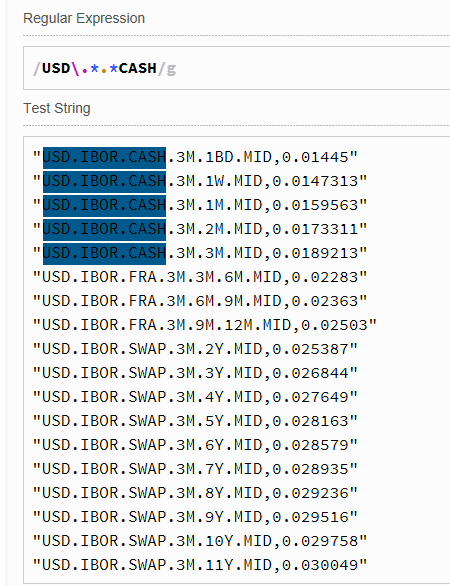
Handy way to create and test regex expressions is to use any online tool available. As an example, the first scenario item (^USD\.*.*CASH) has been applied to a given base market data. The last screenshot below shows all regex matches.

Thanks again for reading this blog.
-Mike


Tuesday, February 6, 2018

Excel : implementing multithreading using C# and Excel-DNA

Multithreading possibilities for VBA has been chewed in this post. My conclusion back then was, that there is no multi-threading possibilities for VBA. One reader has then been commenting this as follows :

"Correct to say there is no multithreading in VBA however, you can very easily create your multithreading functionality in a c# dll and expose the interface via Interops for VBA to consume. Then all you need to do is to pass in the data into the function and walla, you have multithreading. Interops is a very powerful feature and VBA fully supports it."

For the sake of completeness, I will present one possible program to implement such multithreading scheme for Excel, by using Parallel class for the actual multi-threading part and Excel-DNA for interfacing the program back to Excel (using Excel only as Input-Output platform). Excel interfacing part used in this post, has already been completely chewed within this post. Note, that by using instructions given in here or here, one can relatively easy interface this multithreading program back to VBA, instead of Excel.

The program


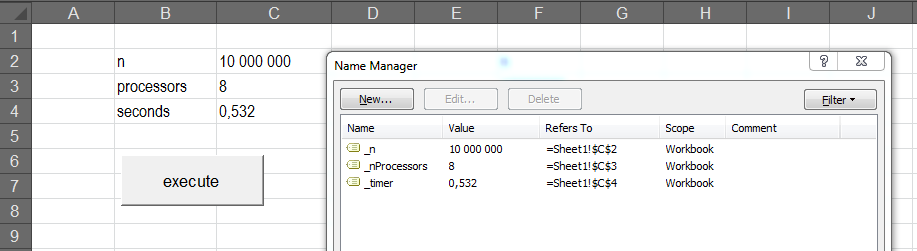
This unsurprising program is simply processing a task (simulate N amount of normally distributed random numbers) shared for M processors. Amount of simulated numbers and number of processors used is decided by the client (Excel). Finally, the program will print the aggregated time consumed for this task back to Excel. Needless to say, the effect of multithreading can be demonstrated by changing the number of processors in Excel worksheet.


Copy-Paste the following program presented below into a new C# project. Also, follow carefully all instructions given in this post.

Thanks for reading this blog.
-Mike

// ExcelInterface.cs
using System;
using System.Collections.Generic;
using System.Diagnostics;
using System.Threading.Tasks;
using System.Windows.Forms;
using ExcelDna.Integration;

namespace ExcelInterface {
    // type definition, delegate for exporting data from processor to queue
    using Processor = Action<int, DataMessenger>;
    public delegate void DataMessenger(List<double> result);

    public static class ExcelInterface {
        // method available in excel
        public static void execute() {
            try {
                // create Excel application object
                dynamic Excel = ExcelDnaUtil.Application;
                //
                // get parameters from worksheet named ranges
                int n = (int)Excel.Range["_n"].Value2;
                int nProcessors = (int)Excel.Range["_nProcessors"].Value2;
                int nPerProcessor = n / nProcessors;
                // create data thread-safe queue and random processors
                RandomQueue messageQueue = new RandomQueue();
                List<Processor> processors = new List<Processor>();
                for (int i = 0; i < nProcessors; ++i) {
                    processors.Add(Factory.CreateProcessor());
                }
                // host timer, execute all processors in parallel
                Stopwatch timer = new Stopwatch();
                timer.Start();
                Parallel.For(0, nProcessors, i => {
                    processors[i].Invoke(nPerProcessor, messageQueue.Enqueue); 
                });
                timer.Stop();
                //
                // print processing time to excel
                double timeElapsed = timer.Elapsed.TotalSeconds;
                Excel.Range["_timer"] = timeElapsed;
            }
            catch (Exception e) {
                MessageBox.Show(e.Message);
            }
        }
    }
}

// RandomQueue.cs
using System;
using System.Collections.Concurrent;
using System.Collections.Generic;

namespace ExcelInterface {
    // wrapper class for ConcurrentQueue data structure
    public class RandomQueue {
        private ConcurrentQueue<List<double>> randomQueue;
        public RandomQueue() {
            randomQueue = new ConcurrentQueue<List<double>>();
        }
        // add
        public void Enqueue(List<double> data) {
            randomQueue.Enqueue(data);
        }
        // remove
        public List<double> Dequeue() {
            List<double> data = null;
            bool hasValue = false;
            while (!hasValue) hasValue = randomQueue.TryDequeue(out data);
            return data;
        }
    }
}
// Factory.cs
using System;
using System.Collections.Generic;

namespace ExcelInterface {
    // type definition
    using Processor = Action<int, DataMessenger>;
    
    public static class Factory {
        // factory method for creating processor for random generator
        public static Processor CreateProcessor() {
            //
            // create standard normal variable generator
            // using action delegate and lambda expression
            Processor process =
            (int n, DataMessenger dataMessenger) => {
                Random generator = new Random(Guid.NewGuid().GetHashCode());
                List<double> normalRandomList = new List<double>();
                // loop through n
                for (int i = 0; i < n; ++i) {
                    double uniformRandomSum = 0.0;
                    // create standard normal random variable using CLT
                    for (int j = 0; j < 12; ++j) {
                        double uniformRandom = 0.0;
                        while (true) {
                            uniformRandom = generator.NextDouble();
                            if (uniformRandom > 0.0) break;
                        }
                        uniformRandomSum += uniformRandom;
                    }
                    normalRandomList.Add(uniformRandomSum - 6.0);
                }
                // send list of normal random variables to queue
                dataMessenger(normalRandomList);
            };
            return process;
        }
    }
}

Friday, December 29, 2017

QuantLib : implementing Equity-linked note using Monte Carlo framework

Within the last post, an implementation for a simple custom instrument and analytical pricing engine was presented. This post is presenting a bit more complex implementation for an equity-linked note, using custom pricing engine implementation built on the top of QuantLib Monte Carlo framework.


Term sheet


The most essential transaction details have been presented within the following screenshot below.


In a nutshell, 3-year holding period has been divided into three annual periods. For each period, running cumulative (but capped) coupon will be calculated based on simulated index fixing values (Geometric Brownian Motion). At the end of each period, period payoff (floored) will be calculated. Pricing-wise, this period payoff will then be discounted to present valuation date. Structure total PV is the sum of all discounted period payoffs.

In order to get more familiar with QuantLib Monte Carlo framework, one may take a look at Implementing QuantLib blog or get the actual book on QuantLib implementation from Leanpub. Also, MoneyScience is organizing Introduction to QuantLib Development course regularly. The most essential parts of the library are thoroughly covered during this 3-day training course, hosted by QuantLib lead developer Luigi Ballabio. Thanks for reading this blog. Merry Christmas and Happy New Year for everybody.

-Mike


// EquityLinkedNote.h
#pragma once
#include <ql/quantlib.hpp>
using namespace QuantLib;
//
// instrument implementation for equity-linked note
class EquityLinkedNote : public Instrument {
public:
 // forward class declarations
 class arguments;
 class engine;
 //
 // ctor and implementations for required base class methods
 EquityLinkedNote(Real notional, Real initialFixing, const std::vector<Date>& fixingDates, 
  const std::vector<Date>& paymentDates, Real cap, Real floor);
 bool isExpired() const;
private:
 void setupArguments(PricingEngine::arguments* args) const;
 // term sheet information
 Real notional_;
 Real initialFixing_;
 std::vector<Date> fixingDates_;
 std::vector<Date> paymentDates_;
 Real cap_;
 Real floor_;
};
// inner arguments class
class EquityLinkedNote::arguments : public PricingEngine::arguments{
public:
 void validate() const;
 Real notional;
 Real initialFixing;
 std::vector<Date> fixingDates;
 std::vector<Date> paymentDates;
 Real cap;
 Real floor;
};
// inner engine class
class EquityLinkedNote::engine
 : public GenericEngine<EquityLinkedNote::arguments, EquityLinkedNote::results> {
 // base class for all further engine implementations
};
//
//
// path pricer implementation for equity-linked note
class EquityLinkedNotePathPricer : public PathPricer<Path> {
public:
 EquityLinkedNotePathPricer(Real notional, Real initialFixing, const std::vector<Date>& fixingDates,
  const std::vector<Date>& paymentDates, Real cap, Real floor, const Handle<YieldTermStructure>& curve);
 Real operator()(const Path& path) const;
private:
 Real notional_;
 Real initialFixing_;
 std::vector<Date> fixingDates_;
 std::vector<Date> paymentDates_;
 Real cap_;
 Real floor_;
 Handle<YieldTermStructure> curve_;
};
//
//
// monte carlo framework engine implementation for base engine class
template <typename RNG = PseudoRandom, typename S = Statistics>
class EquityLinkedNoteMonteCarloPricer : public EquityLinkedNote::engine, private McSimulation<SingleVariate, RNG, S> {
public:
 // ctor
 EquityLinkedNoteMonteCarloPricer(const boost::shared_ptr<StochasticProcess>& process,
  const Handle<YieldTermStructure>& curve, bool antitheticVariate, Size requiredSamples,
  Real requiredTolerance, Size maxSamples, BigNatural seed)
  : McSimulation<SingleVariate, RNG, S>(antitheticVariate, false), process_(process), curve_(curve),
  requiredSamples_(requiredSamples), requiredTolerance_(requiredTolerance), maxSamples_(maxSamples), seed_(seed) {
   // register observer (pricer) with observables (stochastic process, curve)
   registerWith(process_);
   registerWith(curve_);
  }
 // implementation for required base engine class method
 void calculate() const {
  // the actual simulation process will be performed within the following method
  McSimulation<SingleVariate, RNG, S>::calculate(requiredTolerance_, requiredSamples_, maxSamples_);
  this->results_.value = this->mcModel_->sampleAccumulator().mean();
  //
  if (RNG::allowsErrorEstimate) {
   this->results_.errorEstimate = this->mcModel_->sampleAccumulator().errorEstimate();
  }
  else {
   this->results_.errorEstimate = Null<Real>();
  }
 }
private:
 // type definitions
 typedef McSimulation<SingleVariate, RNG, S> simulation;
 typedef typename simulation::path_pricer_type path_pricer_type;
 typedef typename simulation::path_generator_type path_generator_type;
 //
 // implementation for McSimulation class virtual method
 TimeGrid timeGrid() const {
  // create time grid based on a set of given index fixing dates
  Date referenceDate = curve_->referenceDate();
  DayCounter dayCounter = curve_->dayCounter();
  std::vector<Time> fixingTimes(arguments_.fixingDates.size());
  for (Size i = 0; i != fixingTimes.size(); ++i) {
   fixingTimes[i] = dayCounter.yearFraction(referenceDate, arguments_.fixingDates[i]);
  }
  return TimeGrid(fixingTimes.begin(), fixingTimes.end());
 }
 // implementation for McSimulation class virtual method
 boost::shared_ptr<path_generator_type> pathGenerator() const {
  // create time grid and get information concerning number of simulation steps for a path
  TimeGrid grid = timeGrid();
  Size steps = (grid.size() - 1);
  // create random sequence generator and return path generator
  typename RNG::rsg_type generator = RNG::make_sequence_generator(steps, seed_);
  return boost::make_shared<path_generator_type>(process_, grid, generator, false);
 }
 // implementation for McSimulation class virtual method
 boost::shared_ptr<path_pricer_type> pathPricer() const {
  // create path pricer implementation for equity-linked note
  return boost::make_shared<EquityLinkedNotePathPricer>(arguments_.notional, arguments_.initialFixing, 
   arguments_.fixingDates, arguments_.paymentDates, arguments_.cap, arguments_.floor, this->curve_);
 }
 // private data members
 boost::shared_ptr<StochasticProcess> process_;
 Handle<YieldTermStructure> curve_;
 Size requiredSamples_;
 Real requiredTolerance_;
 Size maxSamples_;
 BigNatural seed_;
};
//
//
//
//
//
// EquityLinkedNote.cpp
#include "EquityLinkedNote.h"
#include <algorithm>
//
// implementations for equity-linked note methods
EquityLinkedNote::EquityLinkedNote(Real notional, Real initialFixing, const std::vector<Date>& fixingDates,
 const std::vector<Date>& paymentDates, Real cap, Real floor)
 : notional_(notional), initialFixing_(initialFixing), fixingDates_(fixingDates), 
 paymentDates_(paymentDates), cap_(cap), floor_(floor) {
 // ctor
}
bool EquityLinkedNote::isExpired() const {
 Date valuationDate = Settings::instance().evaluationDate();
 // note is expired, if valuation date is greater than the last fixing date
 if (valuationDate > fixingDates_.back())
  return true;
 return false;
}
void EquityLinkedNote::setupArguments(PricingEngine::arguments* args) const {
 EquityLinkedNote::arguments* args_ = dynamic_cast<EquityLinkedNote::arguments*>(args);
 QL_REQUIRE(args_ != nullptr, "arguments casting error");
 args_->notional = notional_;
 args_->initialFixing = initialFixing_;
 args_->fixingDates = fixingDates_;
 args_->paymentDates = paymentDates_;
 args_->cap = cap_;
 args_->floor = floor_;
}
void EquityLinkedNote::arguments::validate() const {
 // checks for some general argument properties
 QL_REQUIRE(notional > 0.0, "notional must be greater than zero");
 QL_REQUIRE(initialFixing > 0.0, "initial fixing must be greater than zero");
 QL_REQUIRE(cap > floor, "cap must be greater than floor");
 // check for date consistency : all payment dates have to be included 
 // within a set of given fixing dates
 for (int i = 0; i != paymentDates.size(); ++i) {
  if (std::find(fixingDates.begin(), fixingDates.end(), paymentDates[i]) == fixingDates.end()) {
   QL_REQUIRE(false, "payment date has to be included within given fixing dates");
  }
 }
}
//
// implementations for equity-linked path pricer methods
EquityLinkedNotePathPricer::EquityLinkedNotePathPricer(Real notional, Real initialFixing, const std::vector<Date>& fixingDates,
 const std::vector<Date>& paymentDates, Real cap, Real floor, const Handle<YieldTermStructure>& curve)
 : notional_(notional), initialFixing_(initialFixing), fixingDates_(fixingDates),
 paymentDates_(paymentDates), cap_(cap), floor_(floor), curve_(curve) {
 // ctor
}
// the actual pricing algorithm for a simulated path is implemented in this method
Real EquityLinkedNotePathPricer::operator()(const Path& path) const {
 Real coupon = 0.0;
 Real cumulativeCoupon = 0.0;
 Real aggregatePathPayoff = 0.0;
 int paymentDateCounter = 0;
 //
 // loop through fixing dates
 for (int i = 1; i != fixingDates_.size(); ++i) {
  // calculate floating coupon, based on simulated index fixing values
  coupon = std::min(path.at(i) / path.at(i - 1) - 1, cap_);
  // add floating coupon to cumulative coupon
  cumulativeCoupon += coupon;
  //
  // calculate period payoff for each payment date
  if (fixingDates_[i] == paymentDates_[paymentDateCounter]) {
   // calculate discounted payoff for current period, add value to aggregate path payoff
   aggregatePathPayoff += std::max(cumulativeCoupon, floor_) * notional_ * curve_->discount(fixingDates_[i]);
   // re-initialize cumulative coupon to zero, look for the next payment date
   cumulativeCoupon = 0.0;
   paymentDateCounter++;
  }
 }
 return aggregatePathPayoff;
}
//
//
//
//
//
// main.cpp
#include "EquityLinkedNote.h"
//
int main() {
 try {
  // common data : calendar, daycounter, dates
  Calendar calendar = TARGET();
  DayCounter dayCounter = Actual360();
  Date transactionDate(30, October, 2017);
  Natural settlementDays = 2;
  Date settlementDate = calendar.advance(transactionDate, Period(settlementDays, Days));
  Settings::instance().evaluationDate() = settlementDate;
  //
  // term sheet parameters
  Real notional = 1000000.0;
  Real initialFixing = 3662.18;
  Real cap = 0.015;
  Real floor = 0.0;
  std::vector<Date> fixingDates {
   Date(30, November, 2017), Date(30, December, 2017), Date(30, January, 2018), 
   Date(28, February, 2018), Date(30, March, 2018), Date(30, April, 2018),
   Date(30, May, 2018), Date(30, June, 2018), Date(30, July, 2018), 
   Date(30, August, 2018), Date(30, September, 2018), Date(30, October, 2018),
   Date(30, November, 2018), Date(30, December, 2018), Date(30, January, 2019), 
   Date(28, February, 2019), Date(30, March, 2019), Date(30, April, 2019),
   Date(30, May, 2019), Date(30, June, 2019), Date(30, July, 2019), 
   Date(30, August, 2019), Date(30, September, 2019), Date(30, October, 2019),
   Date(30, November, 2019), Date(30, December, 2019), Date(30, January, 2020), 
   Date(29, February, 2020), Date(30, March, 2020), Date(30, April, 2020),
   Date(30, May, 2020), Date(30, June, 2020), Date(30, July, 2020), 
   Date(30, August, 2020), Date(30, September, 2020), Date(30, October, 2020)
  };
  std::vector<Date> paymentDates {
   Date(30, October, 2018), Date(30, October, 2019), Date(30, October, 2020)
  };
  //
  // create structured equity-linked note
  auto note = boost::make_shared<EquityLinkedNote>(notional, initialFixing, fixingDates, paymentDates, cap, floor);
  //
  // market data
  // create discount curve
  Real riskFreeRate = 0.01;
  auto riskFreeRateQuote = boost::make_shared<SimpleQuote>(riskFreeRate);
  Handle<Quote> riskFreeRateHandle(riskFreeRateQuote);
  auto riskFreeRateTermStructure = boost::make_shared<FlatForward>(settlementDate, riskFreeRateHandle, dayCounter);
  Handle<YieldTermStructure> riskFreeRateTermStructureHandle(riskFreeRateTermStructure);
  //
  // create stochastic process
  Handle<Quote> initialFixingHandle(boost::shared_ptr<Quote>(new SimpleQuote(initialFixing)));
  Real volatility = 0.16;
  auto volatilityQuote = boost::make_shared<SimpleQuote>(volatility);
  Handle<Quote> volatilityHandle(volatilityQuote);
  Handle<BlackVolTermStructure> volatilityTermStructureHandle(boost::shared_ptr<BlackVolTermStructure>
   (new BlackConstantVol(settlementDays, calendar, volatilityHandle, dayCounter)));
  auto process = boost::make_shared<BlackScholesProcess>(initialFixingHandle, riskFreeRateTermStructureHandle, volatilityTermStructureHandle);
  //
  // create simulation-related attributes
  bool useAntitheticVariates = false;
  Size requiredSamples = 1000;
  Real requiredTolerance = Null<Real>();
  Size maxSamples = 1000;
  BigNatural seed = 0;
  //
  auto engine = boost::make_shared<EquityLinkedNoteMonteCarloPricer<PseudoRandom, Statistics>>
   (process, riskFreeRateTermStructureHandle, useAntitheticVariates, requiredSamples, requiredTolerance, maxSamples, seed);
  note->setPricingEngine(engine);
  std::cout << note->NPV() << std::endl;
 }
 catch (std::exception& e) {
  std::cout << e.what() << std::endl;
 }
 return 0;
}


Excel


The following screenshots are presenting parameters, result, path simulations and coupon calculations in Excel for this structured note. PV is an average of all discounted path payoffs.